
The Problem With Email-Based Design Reviews
A remote design review is a structured process for collecting, organising, and acting on feedback about a design from stakeholders who are not co-located. CollabDraw replaces email-based review chaos with a shared canvas link where stakeholders leave threaded comments pinned to exact elements, react with emojis, and follow live cursors during walkthroughs — all free, in any browser, with no software installation.
Responses arrive out of sequence. Multiple people send overlapping feedback. By the time you've cross-referenced three email threads, you're less clear on the required changes than when you started.
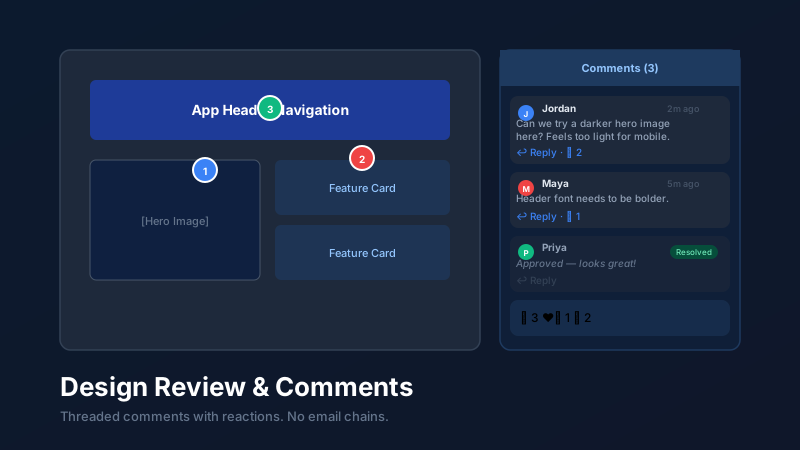
CollabDraw replaces this entirely. Share a canvas link. Stakeholders comment directly on the canvas, pinned to the exact element they're referencing. Feedback is threaded, attributed, and resolvable — no ambiguity, no context loss.
Setting Up Your Canvas for Review
Before sharing for review, spend five minutes structuring your canvas to make the review process smooth:
Organise by section or version
Place related screens or components close together and use named frames to label each section ("Homepage", "Checkout Flow", "Mobile — iOS"). This gives reviewers clear navigational anchors rather than a single undifferentiated canvas.
Add a review brief
Create a sticky note or text box at the top of the canvas with context for reviewers: what stage the design is at, what specific questions you want answered, and what kind of feedback is and isn't useful at this stage. "Focus on navigation structure — not typography or colour, which will be addressed in the next pass" prevents reviewers from spending time on premature details.
Set appropriate permissions
Most reviewers should have Comment access — they can add comments but not edit your design. Reserve Editor access for close collaborators who are actively contributing to the work. Set these permissions in the Share modal before distributing the link.
Threaded Comments: Pinning Feedback to the Canvas
To add a comment in CollabDraw, select the comment tool and click anywhere on the canvas. A pin is placed at that exact position and a text input appears for your comment.
Key features of the comment system:
Threaded replies
Anyone can reply to an existing comment, creating a thread. This keeps a conversation about a specific element contained in one place — not scattered across an email chain.
@mentions
Tag a specific collaborator using @their-name. They receive a notification immediately. Useful for directing a specific question to the designer ("@Jordan can you check this spacing?") or flagging an item for a developer.
Emoji reactions
Reviewers can react to comments with emojis — 👍 for agreement, ❤️ for love, 🔥 for priority, ❓ for a question. Reactions let others signal alignment without creating noise in the thread.
Resolve and archive
Once a comment's feedback has been addressed, mark it as resolved. Resolved comments collapse but remain accessible in the All Comments panel for reference. This gives you a clear picture of what's been addressed and what's still outstanding.
The All Comments Panel
The global comments panel shows every comment across the canvas in a scrollable list. This is essential for asynchronous reviews where multiple people have added feedback at different times.
From the panel you can:
- See all comments in one view without scrolling the canvas
- Click any comment to navigate directly to its position on the canvas
- Filter between open and resolved comments to track progress
- Identify who commented and when — useful for managing multiple reviewers
Live Review Walkthroughs
Asynchronous comments are powerful — but sometimes nothing replaces a live walkthrough where you talk through the design with stakeholders in real time.
CollabDraw's presence features make this seamless:
Live cursors
Every active user's cursor is visible on the canvas with their name attached. As you move around explaining the design, stakeholders see exactly what you're pointing at without needing a screen share setup.
Follow mode
Stakeholders can click your avatar to follow your cursor — their view automatically mirrors yours as you navigate the canvas. They don't need to scroll or zoom manually to keep up.
Real-time annotation during the call
Use the drawing tool to sketch rough annotations live during the call — circle elements you're discussing, draw arrows to indicate changes, add quick sticky notes. Everything appears for everyone instantly.
How CollabDraw Compares to Figma Comments, InVision, and Frame.io
When choosing a free design review tool, the main alternatives are Figma comments (requires a Figma account with limited free projects), InVision (paid plans for full features), and Frame.io (paid video review platform). Here's how CollabDraw stands out:
- Truly free: Threaded comments, emoji reactions, live cursors, and follow mode at no cost — InVision and Frame.io require paid plans
- No sign-up required: Share a link and reviewers comment instantly — Figma, InVision, and Frame.io all require account creation
- All-in-one canvas: Review happens on the same canvas where design happens — no separate review platform needed
- Live walkthroughs: Real-time cursors and follow mode for synchronous review sessions — no screen share required
Key Facts About CollabDraw's Free Design Review Tools
- Price: 100% free — no subscription, no credit card, no watermark
- Review features: Threaded comments, @mentions, emoji reactions, resolve/archive, live cursors, follow mode
- Permissions: View-only, comment, and editor access levels per collaborator
- Export formats: PNG, PDF, SVG, PPTX — all free
- Account required: No — reviewers don't need to sign up
- Best for: Design teams, agencies, and freelancers running structured remote design reviews
After the Review: Managing Outcomes
A design review is only valuable if it produces clear, actionable outcomes. Use the following workflow to close the loop:
- After the review session, open the All Comments panel and work through every open comment
- For each comment, either make the change and resolve the thread, or add a reply explaining why the feedback won't be implemented
- Add a sticky note to each major change area: "Updated per [name]'s feedback on [date]"
- Once all comments are resolved, update the review brief at the top of the canvas to indicate the version status
- Share the updated canvas with a new link or notify collaborators that the version has been revised
This creates a complete audit trail of feedback and changes — invaluable for client projects, regulated industries, and any context where decisions need to be documented.