
The Question That Echoes Through Every Household
A free weekly meal planner is an online tool for designing printable seven-day meal grids — with recipe notes, prep reminders, and shopping lists — exported for the fridge door. CollabDraw's free meal planner maker gives you table grids, colour coding, and print-ready PDF export — with no sign-up required.
Meal planning is the highest-leverage hour of the week: fewer takeaway temptations, smaller shopping bills, and the end of the 5pm stare-into-the-fridge ritual.
Build Your Planner in CollabDraw
- Set the canvas: A4 portrait — one week per page, magnet-ready
- Create the header: the week's dates and a family name if the planner travels between households
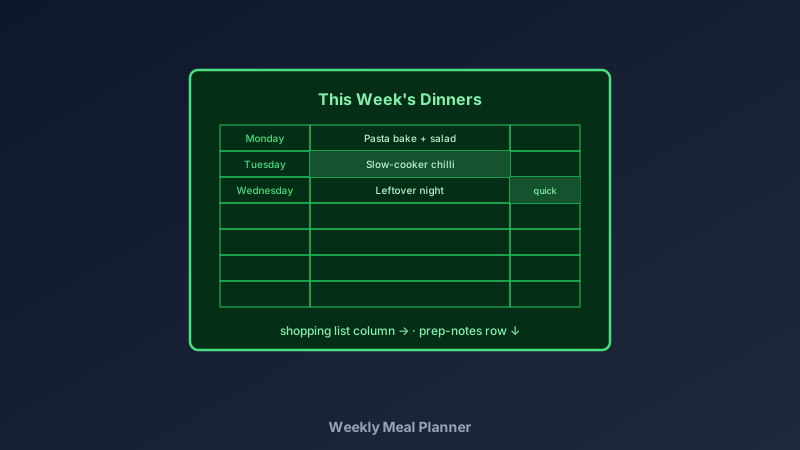
- Build the grid: the table tool makes a 7-row dinner grid — add columns for breakfast and lunch if you plan them too
- Add the shopping list column: a side panel that fills as the week's meals are chosen
- Include a prep row: "take mince out of freezer", "soak beans overnight" — the notes that save the plan
- Colour-code: quick meals, slow-cooker days, and eating-out nights each get a colour
- Export the PDF: print, magnet, admire — dinner decided by Sunday evening
Meal Plans People Actually Stick To
- Family rotation: fifteen tested meals on repeat — plan week one, copy the page, shuffle
- Budget weeks: plan around offers and pantry staples; the shopping list column makes costs visible
- Dietary-specific plans: vegetarian, gluten-free, or high-protein weeks with the constraint baked into every cell
- Batch-cook weeks: cook-once-eat-twice meals flagged in the grid
- Fitness plans: training days paired with the meals that fuel them
- Shared-house plans: flatmates and couples assign cooking nights by colour — fairness made visible
The Planning Habits That Make It Work
- Plan on the same day weekly: Sunday afternoon with a coffee beats "sometime before Monday"
- Shop the list, not the aisle: the built-in list column is the plan's bodyguard
- One new recipe per week maximum: novelty on a weeknight is how plans collapse
- Leftover nights are scheduled, not accidental: put them in the grid on purpose
- Keep the blank template saved: a fresh week starts from the same canvas in one minute
Design Choices That Make Planners Usable
- Big cells: meal names plus notes need room — cramped grids get abandoned by Wednesday
- Three colours maximum: beyond that, the colour code becomes a puzzle
- Week-start to match your shop: plan Monday-to-Sunday if you shop Sundays
- A "swap" note space: plans meet reality — a small blank area captures the swaps
- Pen-friendly print: light backgrounds and thin grid lines take handwriting beautifully
Print Quality for the Fridge
- PDF at exact size: prints true on any home printer
- Multi-page projects: a month of planners in one file — print the block weekly
- PNG export: for the family group chat and digital fridge displays
- No watermark: your planner, your kitchen
- Lamination trick: laminate one planner and use dry-wipe markers — same template, endlessly reusable
How CollabDraw Compares to Apps and Canva
When choosing a free weekly meal planner, the main alternatives are meal-planning apps (subscriptions for features around a simple grid) and Canva (freemium with planner templates behind Pro). Here's how CollabDraw stands out:
- Truly free: Full design and print export at no cost — no subscriptions for a grid and a list
- No sign-up required: Start planning instantly
- Print-first: the fridge remains the best notification system ever invented
- Fully editable layout: columns, colours, and rows exactly how your household eats
- Household collaboration: share the link — everyone adds their requests before planning day
Key Facts About CollabDraw's Free Weekly Meal Planner
- Price: 100% free — no subscription, no credit card, no watermark
- Layouts: 7-day grids with shopping list and prep-note areas
- Colour coding: per-cell fills for quick meals, slow cooks, and nights out
- Export formats: PDF (print), PNG (digital) — all free
- Collaboration: Real-time planning with the whole household
- Account required: No — start without signing up
- Best for: Families, budget planning, dietary goals, and shared households
Let the AI Assistant Design It For You
Prefer to skip the manual setup entirely? CollabDraw's free AI Assistant does the heavy lifting. Tell it what you want to make, and it asks a few quick questions about your idea — purpose, style, content — then builds a fully editable, layered design on your canvas. Every element stays editable, so you can refine the result with the techniques in this guide rather than starting from a blank page.
Start From a Ready-Made Template Instead
CollabDraw also includes a built-in template library — 50 editable templates free without an account, 100 with a free account. Ones that match this guide: the Weekly Planner board template — its day-grid structure adapts directly to meal planning. Open the Templates panel, click one, and it drops onto your canvas fully editable.
Print Your First Plan Free
You don't need an account to open CollabDraw and plan the week. No download, no credit card, no sign-up wall.
One printed page ends a week of dinner negotiations — free on CollabDraw.