
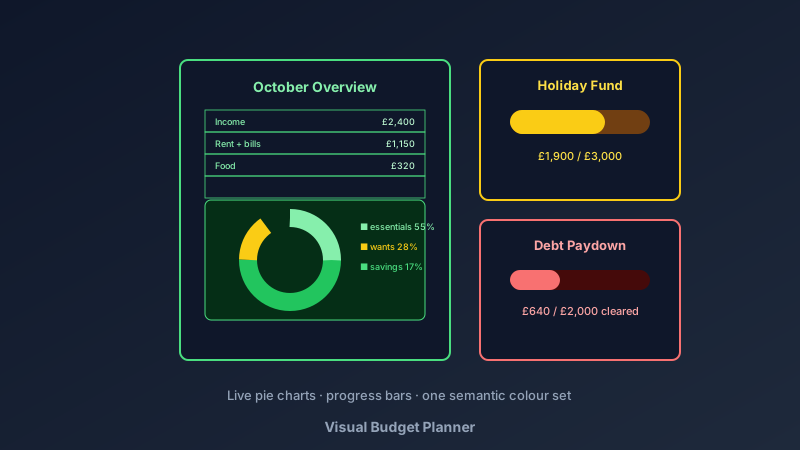
Money Stress Shrinks When Money Becomes Visible
A free visual budget planner is an online tool for designing printable budget pages — income and expense tables, spending-breakdown charts, savings-goal trackers, and debt paydown bars. CollabDraw's free budget planner maker gives you live chart objects, table grids, and print-ready PDF export — with no sign-up required.
Spreadsheets track money; visuals change behaviour. A pie chart showing takeaways ate 12% of last month does more than any number in a cell.
The Pages of a Working Budget Binder
- Monthly overview: income at top, fixed costs, variable categories, and the total left over — the one-page truth
- Spending breakdown: a pie or bar chart of the month's categories — the picture that changes habits
- Savings goal tracker: a progress bar or thermometer filling as the target approaches
- Debt paydown page: each debt as a shrinking bar — the most motivating page in the binder
- Bill tracker: every bill, its due date, and a checkbox per month
- Annual summary: twelve small month-columns for the year-at-a-glance view
Build Yours in CollabDraw
- Set the canvas: A4 portrait — one page per budget section, multi-page projects for the full binder
- Create the overview page: the table tool lays out income rows, category rows, and a totals row
- Add the live chart: insert a pie chart, open the data editor, enter your category totals — it renders instantly and updates when you retype
- Build the goal tracker: a progress-bar chart or hand-styled bar filling toward the target
- Colour with intent: green for income and progress, red only for debt — consistent semantics across every page
- Leave fill-in space: printed budgets get written on — blank cells are a feature
- Export the PDF: print the set, punch it, start the binder
Budget Methods, Visually
- 50/30/20: three coloured bands — needs, wants, savings — with your actual percentages charted beside them
- Zero-based: every unit of income assigned a row; the chart proves total = income
- Cash-envelope pages: one tracker per envelope category with a weekly spend line
- Sinking funds: a grid of annual costs (car service, holidays, Christmas) each with its own progress bar
- Debt snowball or avalanche: ordered debt bars showing the sequence and the shrinking total
The Numbers That Make Budgets Work
- Track a month before planning one: the first pie chart is data, not aspiration
- Fixed costs first: rent, utilities, and minimums assigned before anything flexible
- An emergency line, not an emergency hope: a small weekly deposit row that never gets skipped
- Round, imperfect targets: budgets fail on precision and succeed on consistency
- Monthly review ritual: same day each month — last month's chart beside this month's plan
Print Quality for the Binder
- PDF at exact size: A4 pages punch and file cleanly
- Charts print crisp: vector-based chart rendering at full resolution
- PNG export: for budgeting communities and digital binders
- Multi-page projects: overview, charts, goals, and debt pages export as one PDF
- No watermark: your finances, your pages
- Reusable monthly: the saved canvas re-dates each month — charts re-entered in minutes
How CollabDraw Compares to Budget Apps and Canva
When choosing a free visual budget planner, the main alternatives are budgeting apps (subscriptions, and bank connection you may not want) and Canva (freemium with finance templates behind Pro). Here's how CollabDraw stands out:
- Truly free: Full design, live charts, and print export at no cost
- No sign-up required: Start planning instantly
- No bank connection: your numbers stay yours — written on paper, not synced anywhere
- Live charts included: pie and bar charts update from your data at no charge
- A complete binder, one tool: every page designed and exported together
Key Facts About CollabDraw's Free Visual Budget Planner
- Price: 100% free — no subscription, no credit card, no watermark
- Pages: Overview, spending charts, savings goals, debt trackers, bill lists
- Charts: 26 live chart types with editable data
- Export formats: PDF (print), PNG (digital) — all free
- Account required: No — start without signing up
- Best for: Household budgeting, savings goals, debt paydown, and budget binders
Let the AI Assistant Design It For You
Prefer to skip the manual setup entirely? CollabDraw's free AI Assistant does the heavy lifting. Tell it what you want to make, and it asks a few quick questions about your idea — purpose, style, content — then builds a fully editable, layered design on your canvas. Every element stays editable, so you can refine the result with the techniques in this guide rather than starting from a blank page.
Start From a Ready-Made Template Instead
CollabDraw also includes a built-in template library — 50 editable templates free without an account, 100 with a free account. Ones that match this guide: the Dashboard board template — its chart-and-panel layout adapts directly to budget pages. Open the Templates panel, click one, and it drops onto your canvas fully editable.
Print Your First Budget Page Free
You don't need an account to open CollabDraw and build your binder. No download, no credit card, no sign-up wall.
Money you can see is money you can steer — free on CollabDraw.