
UML Without the Paywall
A free UML diagram tool is an online editor for drawing Unified Modeling Language diagrams — class boxes with attributes and methods, sequence lifelines, use-case actors — using standard notation engineers recognise. CollabDraw's free UML diagram tool gives you rectangles, connector types, and unlimited diagrams — with no sign-up and no 3-document cap.
UML has outlived every prediction of its death for one reason: a class diagram remains the fastest way to align five engineers on a design.
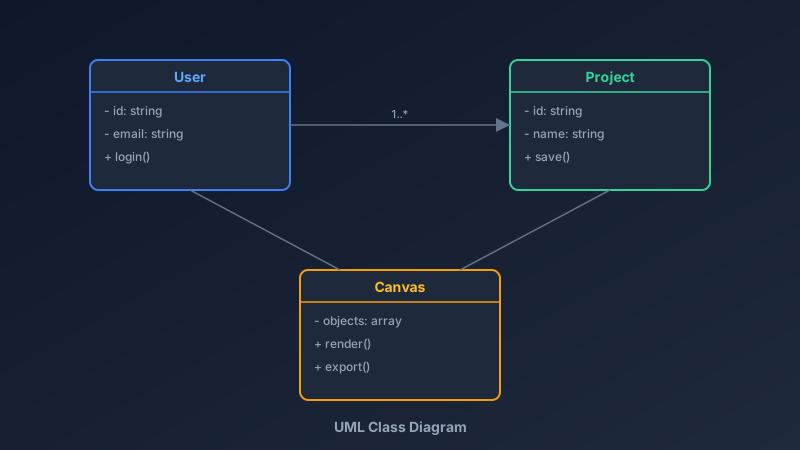
Class Diagrams: The Workhorse
Every class box has three compartments, top to bottom:
- Name: the class, bold and centred
- Attributes: fields with visibility markers — - private, + public, # protected
- Methods: operations with the same visibility markers
The connectors carry the architecture:
- Inheritance: hollow triangle arrow, child pointing at parent
- Composition: filled diamond at the owner — the part dies with the whole
- Aggregation: hollow diamond at the owner — the part survives independently
- Association: plain line with multiplicities (1, 0..*, 1..*)
- Dependency: dashed arrow for "uses temporarily"
Build Class Diagrams in CollabDraw
- Create class boxes: rectangles with two internal divider lines for the compartments
- Type the members: text blocks with - id: string style notation
- Connect the classes: lines with arrowheads and diamonds for relationship types
- Add multiplicities: "1..*" labels beside the associations
- Group by package: colour-code boxes by bounded context or module
The Other Diagrams Worth Knowing
- Sequence diagrams: vertical lifelines, horizontal arrows in time order — perfect for API flows and authentication handshakes
- Use-case diagrams: stick-figure actors and oval use cases — the stakeholder-friendly view of system scope
- Activity diagrams: flowcharts with decision diamonds — business logic and workflows
Sequence diagrams are especially valuable for interview preparation and system design discussions.
Keeping UML Alive (Unlike Most Documentation)
UML rots when it's written once and never touched. Keep it breathing:
- Diagram the change, not the system: new designs get UML; stable code mostly doesn't need it
- Review designs on the diagram: real-time cursors make design reviews concrete
- Version per epic: duplicate the canvas per major feature branch discussion
- Export into docs: PNG for the README, SVG for the engineering wiki
Who Uses UML Today?
- Software architects: design reviews and technical decision records
- CS students: coursework requires correct notation — marks depend on the arrows
- Backend teams: sequence diagrams for API contracts between services
- Interviewees: system design interviews reward clean, quick modelling
- Technical writers: class diagrams embedded in developer documentation
How CollabDraw Compares to draw.io and PlantUML
When choosing a free UML tool, the main alternatives are draw.io (free but dated interface with clunky collaboration) and PlantUML (free text-based rendering with no visual editor). Here's how CollabDraw stands out:
- Truly free: Unlimited diagrams, no watermark, no account wall
- No sign-up required: Start modelling instantly
- Visual editing, not text syntax: drag and connect — no PlantUML syntax errors
- Real-time design reviews: live cursors and comments on the diagram itself
- Whole workspace context: keep UML beside requirements docs and flowcharts
Key Facts About CollabDraw's Free UML Diagram Tool
- Price: 100% free — no subscription, no credit card, no watermark
- Diagram types: Class, sequence, use-case, and activity — all fully customisable
- Connectors: Inheritance, composition, aggregation, association, dependency
- Collaboration: Real-time editing with comments for design reviews
- Export formats: PNG, PDF, and SVG — all free
- Account required: No — start without signing up
- Best for: Software design, architecture reviews, CS coursework, and interview prep
Let the AI Assistant Design It For You
Prefer to skip the manual setup entirely? CollabDraw's free AI Assistant does the heavy lifting. Tell it what you want to make, and it asks a few quick questions about your idea — purpose, style, content — then builds a fully editable, layered design on your canvas. Every element stays editable, so you can refine the result with the techniques in this guide rather than starting from a blank page.
Start From a Ready-Made Template Instead
CollabDraw also includes a built-in template library — 50 editable templates free without an account, 100 with a free account. Ones that match this guide: the Sequence Diagram, State Machine Diagram, and Data Flow Diagram templates. Open the Templates panel, click one, and it drops onto your canvas fully editable — proper UML-style notation already laid out; rename the lifelines and states.
Start Modelling Free
You don't need an account to open CollabDraw and draw your first class box. No download, no credit card, no sign-up wall.
Engineers, architects, and students: design it before you build it — free on CollabDraw.