
The Best Trips Are Planned on One Page
A free travel itinerary planner is an online tool for designing day-by-day trip schedules — arrival times, bookings, travel legs, and free time — plus packing lists and budgets, exported as print-ready PDFs or shared as live links. CollabDraw's free itinerary planner gives you tables, QR codes, and multi-page projects — with no sign-up required.
Group trips collapse into chaos without one shared plan. A single itinerary page in the group chat — times, addresses, booking numbers — keeps six people moving as one.
Build Your Itinerary in CollabDraw
- Set the canvas: A4 portrait — one page per travel day keeps the structure calm
- Create the header: destination, dates, and travellers — the page that orients everyone
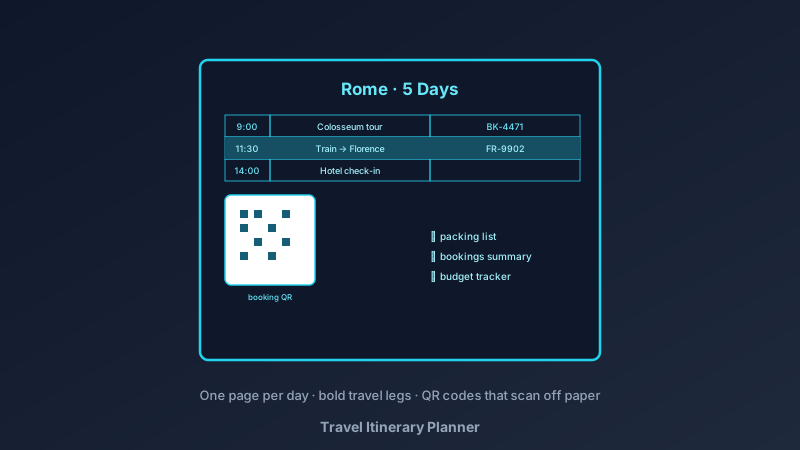
- Build the day table: columns for time, activity, location, and booking reference
- Add the travel legs: flights, trains, and drives as bold rows — connections get their own rows so nothing hides
- Generate QR codes: one per booking — reservation pages, map pins, and ticket links scan straight from the printed page
- Add the extras pages: packing list with checkboxes, budget tracker, and an addresses-and-numbers page
- Export and share: PDF for printing, PNG for the group chat, or a live link that updates as plans shift
Itinerary Structure That Survives Contact With Reality
- Two anchors per day: a morning and an afternoon fixed point — the gaps are where holidays happen
- Travel-time rows: getting between places is an activity; writing it down makes schedules honest
- Buffer after arrivals: the first day's plan ends at check-in — jet lag wins otherwise
- One wet-weather option: a line at each day's bottom — the museum that saves the rainy afternoon
- Booked vs flexible colouring: reserved activities in one colour, options in another — everyone sees what's fixed
- Rest days on long trips: schedule nothing every fourth day — the trip needs it more than the extra sight
The Supporting Pages That Make Trips Smooth
- Packing list: checkbox grid by category — documents, tech, clothes, medicine; shared canvases let everyone add their own rows
- Bookings summary: every confirmation number on one page — the page you actually open at the counter
- Budget tracker: estimated vs spent, with a running total row
- Food shortlist: the restaurants saved from months of scrolling, mapped by neighbourhood
- Kids' page: a simplified version for children — pictures for each day's highlight
Sharing With Companions
- Live link, real-time edits: companions comment on the plan before departure — disputes settle in the thread, not at the station
- Printed copies: the PDF works where phones die, roam, and run out of battery
- QR codes do the carrying: reservations, maps, and tickets scan from the page — no app archaeology
- Version after the trip: the itinerary canvas becomes the skeleton for the photo collage
- Reusability: duplicate the project, re-date it — the weekend-city-break template earns its keep for years
Print and Digital From One Design
- PDF at exact size: prints true for the travel folder
- PNG export: crisp pages for messaging and cloud drives
- Multi-page projects: all days plus support pages export as one document
- No watermark: your trip, your plan
- QR codes built in: styled to match the itinerary, scanned straight off the paper
How CollabDraw Compares to Trip Apps and Canva
When choosing a free travel itinerary planner, the main alternatives are trip-planning apps (subscriptions, and features fragmented across maps, docs, and bookings) and Canva (freemium with template limits). Here's how CollabDraw stands out:
- Truly free: Full planning, QR codes, and export at no cost
- No sign-up required: Start planning instantly
- One shared canvas: itinerary, bookings, packing, and budget live together
- Live collaboration: companions edit and comment in real time before and during the trip
- Print-first reliability: the plan that works when the phone doesn't
Key Facts About CollabDraw's Free Travel Itinerary Planner
- Price: 100% free — no subscription, no credit card, no watermark
- Structure: Day-by-day tables, booking rows, and support pages
- QR codes: Built-in generator for reservations, maps, and tickets
- Export formats: PDF (print), PNG (digital) — all free
- Collaboration: Real-time planning with travel companions
- Account required: No — start without signing up
- Best for: Family holidays, group trips, city breaks, road trips, and honeymoons
Let the AI Assistant Design It For You
Prefer to skip the manual setup entirely? CollabDraw's free AI Assistant does the heavy lifting. Tell it what you want to make, and it asks a few quick questions about your idea — purpose, style, content — then builds a fully editable, layered design on your canvas. Every element stays editable, so you can refine the result with the techniques in this guide rather than starting from a blank page.
Start From a Ready-Made Template Instead
CollabDraw also includes a built-in template library — 50 editable templates free without an account, 100 with a free account. Ones that match this guide: the Project Timeline board template — its scheduled-rows structure adapts directly to travel days. Open the Templates panel, click one, and it drops onto your canvas fully editable.
Plan Your Next Trip Free
You don't need an account to open CollabDraw and build an itinerary. No download, no credit card, no sign-up wall.
The group chat deserves one page with all the answers — free on CollabDraw.