
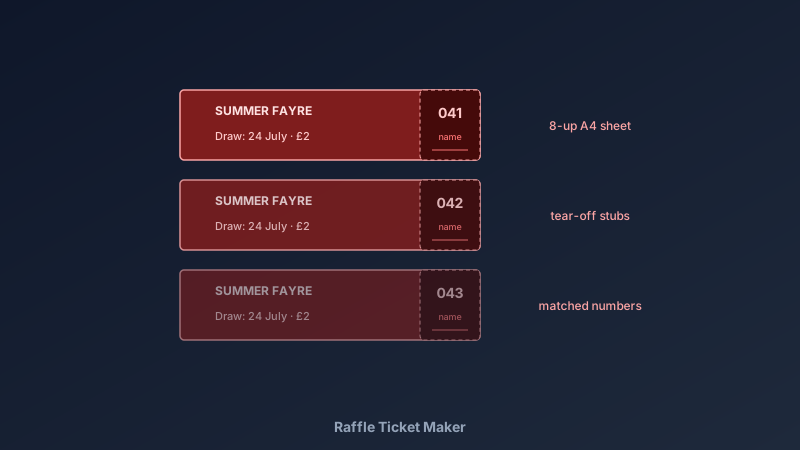
Every Fundraiser Runs on Its Tickets
A free raffle ticket maker is an online design tool for creating numbered event tickets — with tear-off stubs, event branding, and draw details — exported as print-ready sheets. CollabDraw's free raffle ticket maker gives you precise layouts, easy numbering, and free PDF export — with no sign-up required.
School fêtes, charity draws, club fundraisers — the ticket is the product. A well-designed ticket sells more entries and makes the event feel legitimate before a single prize is announced.
Anatomy of a Raffle Ticket
- Event identity: the cause, prize, and draw date — buyers need all three at a glance
- Matching numbers: the same number on the main ticket and the stub — the whole point of the stub
- Stub fields: name and phone lines so sellers can contact the winner
- Tear line: a dashed line and perforation-friendly spacing between stub and ticket
- Price: printed on the ticket — no haggling, no confusion
- Organiser details: required for licensed raffles; check local rules for charity draws
Build Your Tickets in CollabDraw
- Set the canvas: A4 portrait holds eight tickets (2 × 4) at the classic 5 × 14 cm ticket size
- Design one ticket: border, event name, prize line, draw date, price, number box, and stub with name/phone lines
- Add the tear line: a dashed line between main ticket and stub
- Duplicate across the sheet: copy-paste to fill all eight positions with even margins for cutting
- Number efficiently: duplicate the page for each batch of eight and change the numbers — or print 1–500 as a mixed stack
- Export the PDF: print on paper or light card, cut, sell
Numbering Without Tears
- Unique per ticket, identical per pair: main ticket and stub always share their number
- Start at a round number: 001, not 1 — zero-padded numbers sort and read cleanly
- Batch by book: 1–50 to seller A, 51–100 to seller B — sellers track their own sales
- Keep the master list: a simple log of which number ranges went where resolves every dispute
- Draw from the stubs: collect stubs in a box, draw publicly, announce the number, then match the name
Design Choices That Sell More Tickets
- The prize is the headline: after the event name, the prize line gets the biggest text
- Brand colours from the cause: school colours, charity branding — instant recognition
- A simple image: an icon or illustration of the prize adds pull without clutter
- Readable at a glance: sellers hand tickets over in seconds — the value proposition must land immediately
- Premium feel for premium draws: heavier card stock and gold borders for big-prize fundraisers
Print and Run the Draw
- PDF at exact page size: ticket dimensions print true for clean cutting
- PNG at 2x: for digital promotion of the raffle
- Multi-page projects: ticket sheet, poster, and flyer in one file — the full fundraiser kit
- No watermark: your tickets carry your cause only
- Announce results everywhere: the flyer and poster templates spread the draw details
How CollabDraw Compares to Ticket Printing Services
When choosing a free raffle ticket maker, the main alternatives are print-shop ticket services (per-ticket costs and minimum orders) and Canva (freemium with template limits). Here's how CollabDraw stands out:
- Truly free: Design and print unlimited tickets — no per-ticket charges or minimum orders
- No sign-up required: Start designing instantly
- Any quantity: 40 tickets for a class fête or 2,000 for a charity draw — same free process
- Full design control: your branding exactly as you want it
- Complete event kit: tickets, posters, and flyers in one canvas ecosystem
Key Facts About CollabDraw's Free Raffle Ticket Maker
- Price: 100% free — no subscription, no credit card, no watermark
- Layouts: 8-up A4 standard, stub and tear line included, any custom size
- Numbering: manual per-batch numbering with matching stub pairs
- Export formats: PDF (print), PNG (digital) — all free
- Account required: No — start without signing up
- Best for: School fundraisers, charity draws, club events, and community raffles
Let the AI Assistant Design It For You
Prefer to skip the manual setup entirely? CollabDraw's free AI Assistant does the heavy lifting. Tell it what you want to make, and it asks a few quick questions about your idea — purpose, style, content — then builds a fully editable, layered design on your canvas. Every element stays editable, so you can refine the result with the techniques in this guide rather than starting from a blank page.
Start From a Ready-Made Template Instead
CollabDraw also includes a built-in template library — 50 editable templates free without an account, 100 with a free account. Ones that match this guide: the Coupon marketing template — its ticket-style frame with terms adapts directly to raffle tickets. Open the Templates panel, click one, and it drops onto your canvas fully editable.
Print Your First Tickets Free
You don't need an account to open CollabDraw and design raffle tickets. No download, no credit card, no sign-up wall.
Your fundraiser deserves tickets that sell themselves — free on CollabDraw.