
If It's Not on a Timeline, It's Not a Plan
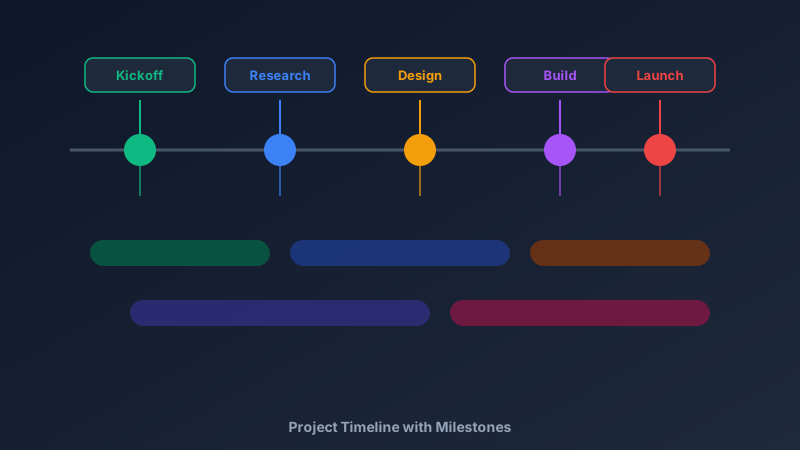
A free project timeline maker is an online tool that lays out work along a horizontal time axis — milestones as markers, phases as bars, dependencies as connectors — so everyone can see what happens when. CollabDraw's free project timeline maker gives you templates, smart connectors, and shareable links on an infinite canvas — with no sign-up required.
Spreadsheets hide dependencies; slide decks go stale the moment a date slips. A live visual timeline solves both.
Anatomy of a Timeline That Works
Four elements carry all the information:
- The axis: a single horizontal line — weeks, months, or quarters left to right
- Milestones: dated markers for non-negotiable moments — launch, review, handover
- Phase bars: colour-coded spans showing duration, not just start dates
- Dependencies: connectors showing what can't start until something else finishes
Build Yours in CollabDraw
- Draw the axis: a straight line across the canvas with date labels beneath
- Place milestones: circles on the line with callout labels above
- Add phase bars: rounded rectangles of varying lengths, colour-coded per team or workstream
- Connect dependencies: smart connectors between bars that stay attached when plans shift
- Annotate risks: sticky notes beside the riskiest stretches
When dates move, drag the bar — attached connectors re-route themselves.
Timelines for Every Kind of Work
- Product roadmaps: quarters across, features grouped by theme
- Marketing launches: brief → creative → build → QA → launch → retro
- Construction projects: milestones for permits, foundations, inspection, handover
- Event planning: venue booked, invites sent, RSVP deadline, day-of schedule
- Student assignments: dissertation and thesis milestones that keep you honest
- Hiring plans: role approved, posted, shortlist, offers, start dates
Share a Timeline People Actually Trust
Static timelines die in inboxes. CollabDraw keeps them alive:
- Live links: stakeholders open the current version anytime — no file attachments
- Real-time edits: change a date and everyone sees it instantly
- Comments on milestones: questions answered where the work is planned
- Password protection: share confidential dates with clients only
- Export: PDF snapshots for contracts and formal project documentation
Timeline Best Practices
- Start from the immovable dates: work backwards from launch, not forwards from optimism
- Show duration, not just deadlines: a bar communicates effort; a dot only communicates panic
- Mark the critical path: one colour or weight for tasks that cannot slip
- Leave slack: a timeline with zero buffer is a fiction everyone can see
- Update it weekly: a stale timeline is worse than none
How CollabDraw Compares to TeamGantt and Canva
When choosing a free project timeline maker, the main alternatives are TeamGantt (free tier limited to one project) and Canva (freemium with timeline templates locked behind Pro). Here's how CollabDraw stands out:
- Truly free: Unlimited timelines, no project caps, no watermark
- No sign-up required: Start plotting instantly — TeamGantt requires an account
- Smart connectors: Dependencies re-route automatically when you move phases
- Bigger-picture workspace: Keep the timeline beside the kanban, diagrams, and briefs on one canvas
- Free export: PNG, PDF, and PPTX for proposals — all free
Key Facts About CollabDraw's Free Project Timeline Maker
- Price: 100% free — no subscription, no credit card, no watermark
- Elements: Milestone markers, phase bars, dependency connectors, date labels
- Templates: Planning board and roadmap templates included
- Collaboration: Real-time editing with comments and share links
- Export formats: PNG, PDF, SVG, and PPTX — all free
- Account required: No — start without signing up
- Best for: Product roadmaps, launch plans, construction schedules, events, and coursework
Let the AI Assistant Design It For You
Prefer to skip the manual setup entirely? CollabDraw's free AI Assistant does the heavy lifting. Tell it what you want to make, and it asks a few quick questions about your idea — purpose, style, content — then builds a fully editable, layered design on your canvas. Every element stays editable, so you can refine the result with the techniques in this guide rather than starting from a blank page.
Start From a Ready-Made Template Instead
CollabDraw also includes a built-in template library — 50 editable templates free without an account, 100 with a free account. Ones that match this guide: the Roadmap Planning and 30-60-90 Day Plan boards, plus the Roadmap Overview presentation slide. Open the Templates panel, click one, and it drops onto your canvas fully editable — structured planning frames that pair with a visual timeline.
Start Planning Free
You don't need an account to open CollabDraw and place your first milestone. No download, no credit card, no sign-up wall.
Project managers, founders, and students: your plan deserves a line everyone can see — free on CollabDraw.