
One Great Photo Is a Post — Five Great Photos Are a Story
A free photo collage maker is an online tool for arranging multiple photos into a single composed layout — grids, freestyle arrangements, or themed designs — with frames, captions, and backgrounds. CollabDraw's free photo collage maker gives you precise alignment tools, image cropping and filters, and high-resolution export — with no sign-up required.
Collages fail in one specific way: photos dumped together without alignment, spacing, or hierarchy. A few layout rules fix that permanently.
Choose Your Layout Type
- Grid: the clean, gallery-style arrangement — perfect for event roundups and social recaps. Equal spacing does the heavy lifting
- Freestyle: photos scattered and slightly rotated at playful angles — perfect for kids' themes, travel diaries, and scrapbook energy
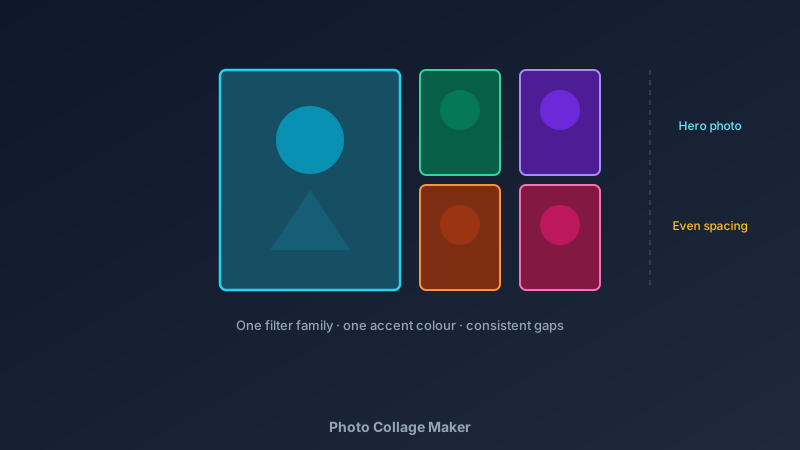
- Feature plus support: one large hero photo with smaller supporting shots — the strongest layout for storytelling because the eye knows where to start
- Strip: a single row or column — ideal for before/after pairs, month-by-month progress, or timeline stories
- Shape-locked: photos cropped into circles, hearts, or frames for themed designs
Build Yours in CollabDraw
- Set the canvas: square for social, A4 or A3 for print, 16:9 for presentations
- Drop in the photos: upload yours, or pull from the built-in stock library
- Crop each photo: the crop tool frames faces and subjects properly — no awkward cut-offs
- Align and space: snap-to-grid plus alignment guides make even spacing automatic
- Unify the look: apply the same filter family to all photos, or add identical frames
- Add captions: short labels for people, places, or dates — one font, consistent size
- Export: PNG for digital, PDF for print, both at full resolution
The Rules That Separate Good Collages From Bad
- Consistent spacing: equal gaps between photos — the single biggest design tell
- One filter family: all warm or all cool; mixed photo treatments look accidental
- Three to seven photos: beyond that, split into a second collage or a multi-page project
- Clear hierarchy: decide which photo leads and make it visibly bigger
- Backgrounds stay quiet: white, soft grey, or a muted colour — busy backgrounds fight the photos
- Captions are optional: use them only when they add information, not decoration
Collages People Actually Make
- Event recaps: birthdays, weddings, team days out — the "here's how it went" post
- Family year-in-review: one photo per month in a strip or grid
- Travel diaries: destination collages with place labels for each shot
- Pet tributes: freestyle layouts with playful rotations — pets suit chaos
- Classroom and team boards: everyone's photo in one grid for walls and slides
- Gift prints: collage plus a frame makes a low-cost, high-sentiment present
Export Quality That Holds Up
- 2x PNG export: crisp on high-resolution phones and retina screens
- PDF for print: full-resolution pages for framing
- Per-photo cropping first: fix framing before layout — never after
- No watermark: your collage carries only your photos
- Multi-page projects: one page per collage for full album sets
How CollabDraw Compares to Canva and Fotor
When choosing a free photo collage maker, the main alternatives are Canva (freemium — premium grid templates and some export options require Pro) and Fotor (collage features gated behind subscription limits). Here's how CollabDraw stands out:
- Truly free: Full layout freedom and high-resolution export at no cost
- No sign-up required: Start collaging instantly
- Pixel-level control: move, crop, and align every photo exactly — not locked to fixed grids
- Built-in crop and filters: edit photos without leaving the canvas
- 7M+ stock images: fill gaps with supporting imagery from the built-in library
Key Facts About CollabDraw's Free Photo Collage Maker
- Price: 100% free — no subscription, no credit card, no watermark
- Layouts: Any arrangement — grids, freestyle, feature-plus-support, strips
- Photo tools: Crop, filters, frames, and alignment guides built in
- Photos: Personal uploads plus 7M+ stock images
- Export formats: PNG (2x), JPEG, and PDF — all free
- Account required: No — start without signing up
- Best for: Event recaps, family keepsakes, travel diaries, classroom boards, and gift prints
Let the AI Assistant Design It For You
Prefer to skip the manual setup entirely? CollabDraw's free AI Assistant does the heavy lifting. Tell it what you want to make, and it asks a few quick questions about your idea — purpose, style, content — then builds a fully editable, layered design on your canvas. Every element stays editable, so you can refine the result with the techniques in this guide rather than starting from a blank page.
Start From a Ready-Made Template Instead
CollabDraw also includes a built-in template library — 50 editable templates free without an account, 100 with a free account. Ones that match this guide: the Vision Board and Mood Board templates. Open the Templates panel, click one, and it drops onto your canvas fully editable — image-led layouts that adapt easily to photo collages.
Start Your First Collage Free
You don't need an account to open CollabDraw and arrange your photos. No download, no credit card, no sign-up wall.
Turn the photos sitting in your camera roll into something worth framing — free on CollabDraw.