
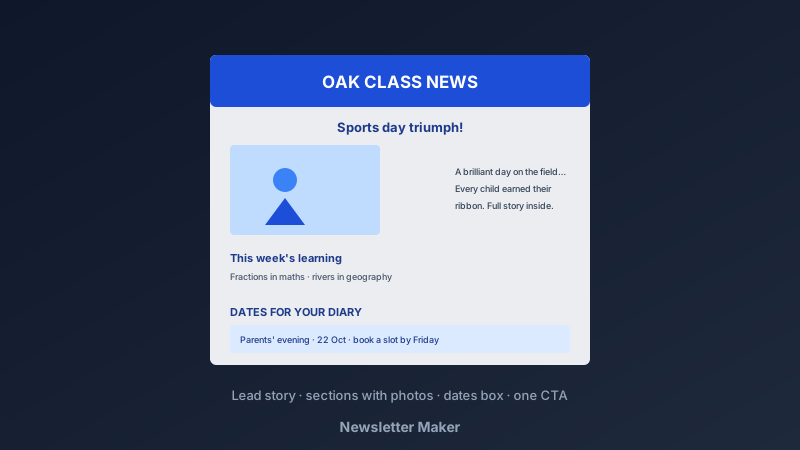
The Newsletter Refuses to Die — Because It Works
A free newsletter maker is an online design tool for creating one-to-many updates — classroom news, business announcements, community bulletins — with structured sections, photos, and clean typography. CollabDraw's free newsletter maker gives you layout control, photo tools, and free PDF and PNG export — with no sign-up required.
Social feeds bury announcements. Inboxes open newsletters. For schools, small businesses, and communities, the newsletter remains the most reliably read communication channel — when it's designed well enough to be read at all.
The Structure That Gets Read
- One lead story: the biggest news gets the biggest headline and photo — everything else supports it
- Three to five sections: scannable chunks with subheadings; newsletters are skimmed first, read second
- Dates box: upcoming events in one list — the section people actually keep the newsletter for
- Photos every section: a picture per story; walls of text kill newsletters
- One call to action: reply, RSVP, visit, volunteer — a newsletter asking five things gets none
Build Yours in CollabDraw
- Set the canvas: A4 for print-and-home newsletters, or 800px-wide portrait for email attachments
- Design the masthead: newsletter name, edition number, and date — consistent every issue
- Lay out the lead story: headline, photo, and two short paragraphs
- Fill the sections: subheading, photo, text — repeat with visual rhythm, alternating layouts
- Add the dates box: a bordered, shaded panel — visually distinct so skimmers find it
- Close with the CTA: one clear ask, styled as a button or bold line
- Export: PDF for print, PNG for embedding in email, or a share link for review
Newsletters Worth Making
- Classroom newsletters: what the class learned, dates, and photos — parents read these religiously
- Small-business updates: new products, opening hours, and staff news in brand colours
- Community and church bulletins: events, volunteers, and notices in a predictable monthly format
- Club and team reports: results, fixtures, and member spotlights
- Family newsletters: the annual round-up that goes to relatives with the holiday card
- Internal company news: wins, changes, and welcome-aboards for teams without a comms platform
Design Choices That Signal Quality
- Consistent masthead: the same name, position, and style every issue — recognition builds readership
- Two fonts, clear hierarchy: a display font for headlines, a workhorse for body text
- Alignment discipline: everything on a grid; ragged layouts read as rushed
- Real photos beat stock: the class on sports day outperforms any stock image for engagement
- White space per section: breathing room between stories keeps skimming comfortable
The Reusable Template System
- Design issue one carefully: it becomes the template for every issue after
- Duplicate the page, swap content: monthly newsletters take minutes once the layout exists
- Multi-page projects: the current issue plus the template page, archived together
- Collaborative writing: share an edit link — contributors fill their sections before send day
- Approval before sending: a view-link review catches typos before the whole list sees them
Export for Every Channel
- PDF: the print-and-distribute format; also the most reliable email attachment
- PNG at 2x: embeds directly in email bodies and social posts
- Multi-page support: longer editions export as one document
- No watermark: your newsletter carries your name only
- Free forever: no send limits or per-download fees
How CollabDraw Compares to Mailchimp and Canva
When choosing a free newsletter maker, the main alternatives are Mailchimp (email-platform complexity for a simple newsletter need) and Canva (freemium with template limits). Here's how CollabDraw stands out:
- Truly free: Full design and export at no cost — no contact-list pricing tiers
- No sign-up required: Start designing instantly
- Print and email from one design: PDF and PNG cover both channels
- Real photos, full control: crop and place images exactly — no rigid email-template blocks
- Team-friendly: collaborative editing and view-link approvals built in
Key Facts About CollabDraw's Free Newsletter Maker
- Price: 100% free — no subscription, no credit card, no watermark
- Sizes: A4 print or email-width custom canvases
- Photos: Personal uploads plus 7M+ stock images with crop tools
- Export formats: PDF (print/email), PNG (2x embed) — all free
- Collaboration: Shared editing and approval links
- Account required: No — start without signing up
- Best for: Teachers, small businesses, clubs, communities, and families
Let the AI Assistant Design It For You
Prefer to skip the manual setup entirely? CollabDraw's free AI Assistant does the heavy lifting. Tell it what you want to make, and it asks a few quick questions about your idea — purpose, style, content — then builds a fully editable, layered design on your canvas. Every element stays editable, so you can refine the result with the techniques in this guide rather than starting from a blank page.
Start From a Ready-Made Template Instead
CollabDraw also includes a built-in template library — 50 editable templates free without an account, 100 with a free account. Ones that match this guide: the Document and Marketing template collections include newsletter-style page layouts. Open the Templates panel, click one, and it drops onto your canvas fully editable — a masthead-and-sections layout ready for your content.
Print Your First Issue Free
You don't need an account to open CollabDraw and design a newsletter. No download, no credit card, no sign-up wall.
Your community is waiting for issue one — free on CollabDraw.