
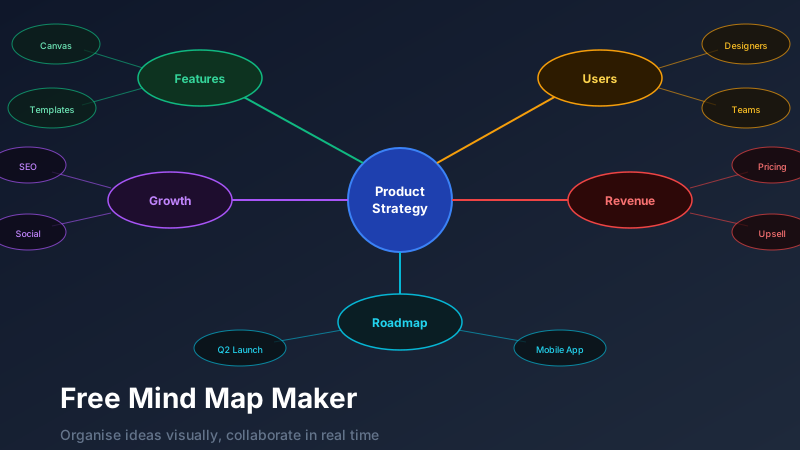
What Is a Mind Map and Why Does It Work?
A free mind map maker is an online tool for creating visual diagrams that organise ideas radially outward from a central concept, using branching nodes and connector lines to show relationships. CollabDraw offers a free mind map maker with colour-coded branches, an infinite canvas, and real-time collaboration — so distributed teams can brainstorm, plan, and organise complex ideas together with no download or sign-up required.
When you force ideas into a bulleted list, you lose the relational connections between them. A mind map preserves those connections. You can see, at a glance, that "user onboarding" is related to both "product features" and "marketing messaging" — a relationship that a linear document buries.
Research consistently shows that mind mapping improves recall, creativity, and the speed of complex decision-making. It's particularly powerful for:
- Brainstorming and idea generation
- Project scoping and planning
- Research and knowledge organisation
- Content strategy and editorial planning
- Learning and note-taking
- Problem analysis and root cause identification
Building a Mind Map in CollabDraw
1. Start with the central concept
Place a shape at the centre of your canvas — typically a circle or rounded rectangle. Double-click to type the core topic: "Product Launch", "2026 Marketing Strategy", "Chapter 5 Notes", "Career Goals".
2. Add first-level branches
Draw lines outward from the centre and add nodes for the main sub-topics. These are your primary categories. For a product launch: "Audience", "Channels", "Timeline", "Budget", "Content", "Metrics".
3. Expand into second and third levels
Each first-level node branches into more specific ideas. "Channels" might branch into "Email", "Social Media", "Paid Ads", "PR". "Social Media" might further branch into "Instagram", "LinkedIn", "Twitter/X".
4. Colour code by category
Assign a consistent colour to each major branch. All nodes in the "Budget" branch are amber, all nodes in the "Timeline" branch are blue. This colour encoding lets you navigate the map by department, theme, or priority without reading every label.
Visual Hierarchy in Mind Maps
Good mind maps use visual hierarchy to signal importance:
- Size — larger nodes for more important or higher-level concepts
- Colour saturation — brighter, more saturated colours for high-priority items
- Line thickness — thicker connector lines between closely related or high-priority nodes
- Icons and emojis — a small icon on a node instantly communicates its category or status
CollabDraw gives you complete control over all of these visual properties for every node and connector.
Collaborative Mind Mapping
The traditional mind map is a solo activity — one person, one pen, one paper. CollabDraw transforms it into a team sport.
For a collaborative mind mapping session:
- Create the canvas with the central concept and share the edit link with your team
- Each team member takes ownership of one major branch
- Set a 15-minute timer for independent expansion — everyone adds their sub-branches without discussing
- Come together to review, discuss overlaps, and identify connections between branches
- Add cross-links between related nodes from different branches using dashed connector lines
The result is a map that reflects the collective knowledge of the team, not just the loudest voice in the room.
Mind Maps for Content Planning
One of the most practical applications of mind mapping is content strategy. Start with your brand's core value proposition at the centre and branch out:
- Audience segments → their specific pain points → content angles that address each pain
- Content formats → blog, video, podcast, social → specific pieces within each format
- Distribution channels → SEO, email, social media, partnerships
- Metrics → organic traffic, email opens, social reach, conversion rate
The resulting map is your entire content strategy on a single canvas. You can drill into any branch to add specific article titles, campaign ideas, or production deadlines.
How CollabDraw Compares to Miro, MindMeister, and XMind
When choosing a free mind map maker, the main alternatives are Miro (requires account and limits free boards), MindMeister (limited to 3 mind maps on free plan), and XMind (desktop download required, no real-time collaboration). Here's how CollabDraw stands out:
- Truly free: Unlimited mind maps with no document count limits or map size caps
- No sign-up required: Start instantly — Miro, MindMeister, and XMind all require account creation or download
- Real-time collaboration: Multiple team members build the same mind map simultaneously with live cursors
- Infinite canvas: No boundaries on map size — expand branches in any direction without running out of space
Key Facts About CollabDraw's Free Mind Map Maker
- Price: 100% free — no subscription, no credit card, no watermark
- Canvas: Infinite, with unlimited nodes and branches
- Customisation: Colour coding, visual hierarchy, icons, and connector styling
- Export formats: PNG, PDF, SVG, PPTX — all free
- Account required: No — start without signing up
- Best for: Brainstorming, project scoping, content planning, and knowledge organisation
Let the AI Assistant Design It For You
Prefer to skip the manual setup entirely? CollabDraw's free AI Assistant does the heavy lifting. Tell it what you want to make, and it asks a few quick questions about your idea — purpose, style, content — then builds a fully editable, layered design on your canvas. Every element stays editable, so you can refine the result with the techniques in this guide rather than starting from a blank page.
Start From a Ready-Made Template Instead
CollabDraw also includes a built-in template library — 50 editable templates free without an account, 100 with a free account. Ones that match this guide: the Mind Map diagram template. Open the Templates panel, click one, and it drops onto your canvas fully editable — a centred node with branches already laid out, ready for your ideas.
Exporting and Sharing Mind Maps
Mind maps are often used as documentation artefacts — captured and shared after a session. Export options:
- PNG — for embedding in wikis, presentations, and documents
- PDF — for high-fidelity documentation that can be printed
- Share link — for ongoing, living mind maps that the team can continue expanding over time
Living mind maps — those that are continually updated as a project evolves — are particularly powerful for complex, long-running initiatives where new information constantly emerges and connections evolve.