
Your Banner Is Above the Fold of Your Career
A free LinkedIn banner maker is an online design tool for creating profile cover images at LinkedIn's exact size — 1584 × 396 pixels — with clean layouts that work around the profile photo and headline area. CollabDraw's free LinkedIn banner maker gives you an exact-size canvas, alignment guides, and crisp PNG export — with no sign-up required.
Recruiters and clients spend seconds on a profile. The default blue-grey banner says "unconsidered." A banner with a clear value line says the opposite before anyone reads a word.
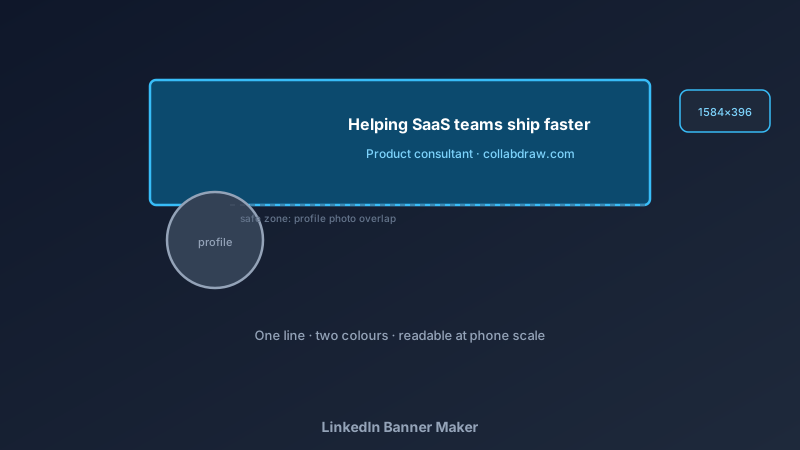
The Size and the Safe Zone
- Exact canvas: 1584 × 396 pixels — design at true size to avoid crop errors
- Left safe zone: the profile photo overlaps the bottom-left on desktop — keep it clear
- Bottom mobile crop: mobile crops the bottom edge tighter — keep key text high and centred
- Text placement: centre or right-of-centre at mid-height survives both desktop and mobile
- Test before export: zoom out to phone-scale — if you can't read it, rebuild bigger
Write the Line That Does the Work
- Who you help + outcome: "Helping SaaS teams ship faster" beats a job title every time
- Keep it under ten words: banners are read in passing, not studied
- One line, maybe two: a positioning line plus a contact or site URL is plenty
- No buzzword soup: "passionate synergy ninja" communicates nothing — specifics communicate everything
- Match your headline: banner line and LinkedIn headline should feel like one sentence split in two
Build Yours in CollabDraw
- Set the exact canvas: 1584 × 396 pixels
- Mark the safe zones: add a temporary outline where the profile photo and mobile crop fall, remove before export
- Choose the background: a brand colour, a subtle gradient, or a clean photo with a dark overlay for text contrast
- Add the positioning line: large, high-contrast, readable at phone scale
- Optional extras: company logo, personal site, or a city tag — restraint wins
- Export PNG: full resolution, upload directly — no recropping
Banner Styles by Goal
- Job seeking: role-focused line plus key skills — make the target role unmistakable
- Consultants and freelancers: client-outcome line plus booking or site URL
- Founders: company mission line plus logo — personal and company brand aligned
- Corporate professionals: understated brand-colour banner with an industry focus line
- Creators: content niche line plus cadence ("weekly design teardowns")
Design Choices That Read as Professional
- One font, two weights: a single clean typeface in regular and bold — restraint signals seniority
- Two colours maximum: background plus accent; more reads as clutter at banner scale
- Generous spacing: the line should breathe — cramped banners look templated
- Photo backgrounds need overlays: a dark gradient behind text keeps it legible
- Consistency with your photo: banner colour that complements your profile photo's background ties the top of the profile together
Export and Upload Right
- PNG at exact 1584 × 396: the platform accepts it without recropping
- Crisp text at 1x: design at true size so nothing blurs on retina screens
- No watermark: your banner carries your brand only
- Free export: no quality paywall — the whole point is looking professional
- Update seasonally: the canvas stays saved — swap the line in seconds
How CollabDraw Compares to Canva
When choosing a free LinkedIn banner maker, the main alternative is Canva (freemium — brand kits and some resize features sit behind Pro). Here's how CollabDraw stands out:
- Truly free: Exact-size design and full-quality export at no cost
- No sign-up required: Start designing instantly
- True-pixel canvas: design at 1584 × 396 — no export scaling issues
- AI image generation included: create a custom background visual on the free tier
- Guides and snapping: precise safe-zone placement without guesswork
Key Facts About CollabDraw's Free LinkedIn Banner Maker
- Price: 100% free — no subscription, no credit card, no watermark
- Size: Exact 1584 × 396 canvas with alignment guides
- Backgrounds: Colours, gradients, 7M+ stock photos, or AI-generated visuals
- Export format: PNG at full resolution — free
- Account required: No — start without signing up
- Best for: Job seekers, consultants, founders, and professionals building a personal brand
Let the AI Assistant Design It For You
Prefer to skip the manual setup entirely? CollabDraw's free AI Assistant does the heavy lifting. Tell it what you want to make, and it asks a few quick questions about your idea — purpose, style, content — then builds a fully editable, layered design on your canvas. Every element stays editable, so you can refine the result with the techniques in this guide rather than starting from a blank page.
Start From a Ready-Made Template Instead
CollabDraw also includes a built-in template library — 50 editable templates free without an account, 100 with a free account. Ones that match this guide: the LinkedIn Profile Banner marketing template. Open the Templates panel, click one, and it drops onto your canvas fully editable — a banner layout ready for your positioning line.
Upgrade Your Profile Free
You don't need an account to open CollabDraw and design your banner. No download, no credit card, no sign-up wall.
The next recruiter to open your profile should see your value instantly — free on CollabDraw.