
What Gets Tracked Gets Done
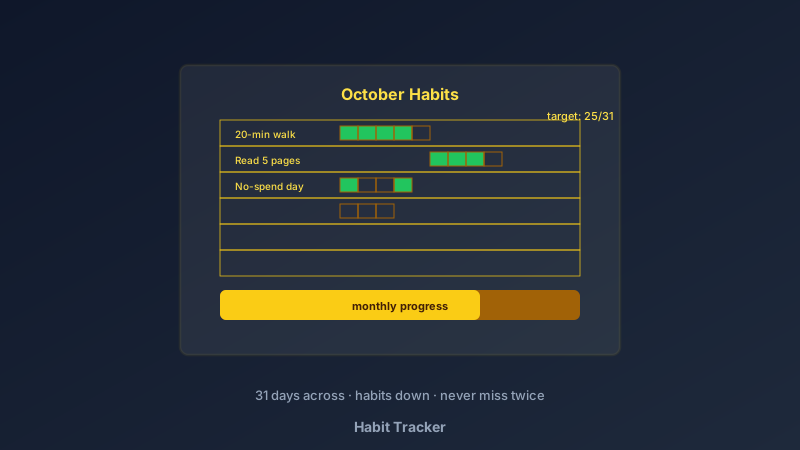
A free habit tracker is an online tool for designing printable habit grids — habits listed down the side, days of the month across the top, one box to tick per habit per day. CollabDraw's free habit tracker maker gives you table grids, colour coding, and print-ready PDF export — with no sign-up required.
Motivation starts habits. Tracking sustains them. The chain of filled boxes does the work that willpower alone never will — you don't break a chain you've built for eleven days.
Build Your Tracker in CollabDraw
- Set the canvas: A4 portrait — one month per page
- Create the header: month name and the year, styled to match your journal or wall
- Build the grid: the table tool makes 31 day-columns; habit rows down the side — six to ten rows fits A4 comfortably
- List your habits: specific and binary — "20-minute walk" beats "exercise"
- Colour-code by category: health in green, learning in blue, home in amber
- Add a monthly goal strip: "target: 25 of 31" per habit — realistic beats heroic
- Export the PDF: print, stick it where the habit happens
Habits Worth Tracking
- Health: steps, water, stretching, sleep-before-midnight — one or two, not all four
- Learning: pages read, language minutes practised, lessons completed
- Money: no-spend days, savings deposited, lunch-packed
- Home: tidy-ten-minutes, laundry done, plants watered
- Mind: journaling, meditation, screen-free evenings
- Family: bedtime stories, device-free dinners, one-to-one time per child
Track Habits, Not Regrets
- Maximum ten habits: trackers with twenty rows get abandoned by day nine
- Binary beats vague: tick or don't — "ate better" can't be tracked, "no sugary drinks" can
- Start smaller than feels impressive: "read 5 pages" tracked daily becomes books; "read an hour" becomes guilt
- Missing one day changes nothing: missing two starts the pattern — the rule is never miss twice
- Review monthly: last month's tracker decides next month's habits — keep what stuck, drop what didn't
- Visual target lines: a shaded goal row ("25/31") turns the grid into a game
Tracker Styles That Keep People Tracking
- Classic grid: the standard — clear, printable, effective
- Theme tracker: a single habit with its own page — the reading tracker or sobriety calendar
- Couples and families: shared rows with initials per tick — gentle accountability
- Bullet-journal style: minimal grid with hand-drawn aesthetics designed in
- Goal ladder: habits ordered so daily wins feed a monthly target at the bottom
- Kids' version: big boxes, fun colours, sticker-friendly — pairs with the routine-chart guide
Print Quality for Daily Use
- PDF at exact size: grid cells print true for pen ticks
- Pen-friendly design: light grid lines and white cells take handwriting cleanly
- PNG export: for tablet use with a stylus
- Multi-page projects: a full year of trackers in one file
- No watermark: your tracker, your goals
- Lamination trick: laminate one month and dry-wipe it — reusable forever
How CollabDraw Compares to Apps and Canva
When choosing a free habit tracker, the main alternatives are habit apps (subscription walls, notification fatigue) and Canva (freemium with tracker templates behind Pro). Here's how CollabDraw stands out:
- Truly free: Full design and print export at no cost
- No sign-up required: Start tracking instantly
- Paper wins for habits: visible, tangible, no app to open — the tick happens where the habit does
- Fully custom grid: rows, columns, and colours exactly as you track
- Year-in-one-file: multi-page projects keep every month archived
Key Facts About CollabDraw's Free Habit Tracker
- Price: 100% free — no subscription, no credit card, no watermark
- Grid: 31-day columns × 10 habit rows standard, fully custom
- Colour coding: per-row and per-cell fills for categories and goals
- Export formats: PDF (print), PNG (digital) — all free
- Account required: No — start without signing up
- Best for: Fitness goals, reading challenges, savings, routines, and family habits
Let the AI Assistant Design It For You
Prefer to skip the manual setup entirely? CollabDraw's free AI Assistant does the heavy lifting. Tell it what you want to make, and it asks a few quick questions about your idea — purpose, style, content — then builds a fully editable, layered design on your canvas. Every element stays editable, so you can refine the result with the techniques in this guide rather than starting from a blank page.
Start From a Ready-Made Template Instead
CollabDraw also includes a built-in template library — 50 editable templates free without an account, 100 with a free account. Ones that match this guide: the Weekly Planner board template — its grid structure adapts directly to habit tracking. Open the Templates panel, click one, and it drops onto your canvas fully editable.
Print Your First Tracker Free
You don't need an account to open CollabDraw and build a habit grid. No download, no credit card, no sign-up wall.
Day one of the chain starts with a printed box — free on CollabDraw.