
Gift Certificates Turn Praise Into Revenue
A free gift certificate maker is an online design tool for creating professional vouchers — for salons, cafes, studios, and service businesses — with branding, value, terms, and redemption details. CollabDraw's free gift certificate maker gives you layout control, QR codes, and print-quality PDF export — with no sign-up required.
"What should I get them?" is a question every happy customer asks. A beautiful gift certificate answers it — and brings a brand-new customer through your door.
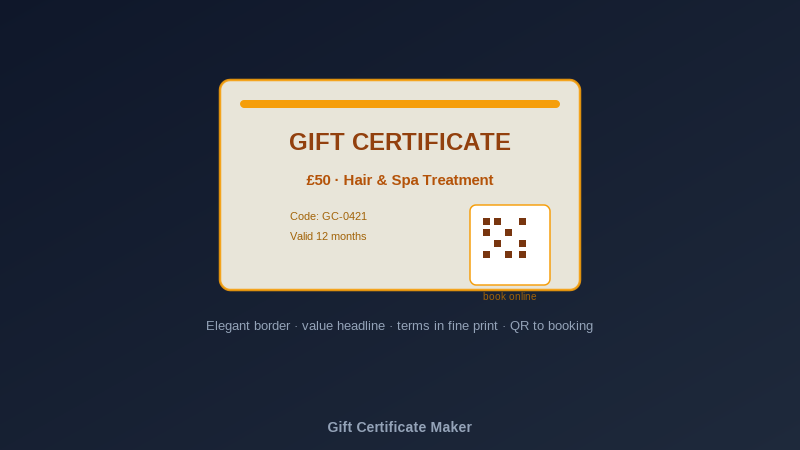
What Every Gift Certificate Needs
- Business name and logo: the certificate represents your brand at its best
- Value or service: a currency amount ("£50") or a specific service ("60-minute massage") — specific services sell better
- Unique code: a handwritten or printed reference for tracking redemptions
- Validity period: clear terms — "Valid 12 months from purchase" prevents awkward conversations
- Redemption instructions: how to book — phone, website, or the QR code
- Signature or stamp line: an authorised touch makes it feel official
Build Yours in CollabDraw
- Set the canvas: A5 landscape is the classic certificate size — substantial but wallet-friendly
- Set the tone: brand colours, an elegant border, and generous white space — restraint reads as premium
- Place the branding: logo top-centre or top-left, business name prominent
- Add the value statement: the largest text on the certificate after the business name
- Include the fine print: terms in small type at the bottom — readable, not hidden
- Generate the QR code: link it to your booking page with the code pre-filled in the URL if your system supports it
- Export the PDF: print on card stock — presentation does half the selling
Design Choices That Signal Quality
- Border = certificate: a thin, elegant frame instantly says "official document"
- Two fonts maximum: a display serif for the value, a clean sans for details
- White space sells: empty space around the value statement reads as luxury
- Consistent with your brand: the certificate should feel like it came from the same place as your menus, cards, and invoices
- Card stock matters: 250+ gsm turns a printout into a gift someone wants to keep
Run Vouchers Like a Business
- Track the codes: a simple spreadsheet of certificate numbers, values, and redemption status
- Set sensible terms: 12 months is standard; expired certificates convert better with a grace extension
- Sell the upsell: "Redeemable against any service" lets customers spend more than the voucher value
- Seasonal versions: Christmas, Mother's Day, and Valentine's variants of the same design multiply sales moments
- Pair with the coupon workflow: discount vouchers and gift certificates share the design skills — see the coupon guide
Export Specs That Just Work
- PDF at exact size: prints crisp at home or any print shop
- PNG at 2x: for email delivery of digital certificates
- Multi-page projects: a sheet of multiple certificates for batch printing
- No watermark: your brand, front and centre
- Free forever: no per-download charges eating your margin
How CollabDraw Compares to Canva and Vistaprint
When choosing a free gift certificate maker, the main alternatives are Canva (freemium — premium certificate templates sit behind Pro) and Vistaprint (printed products at per-unit prices). Here's how CollabDraw stands out:
- Truly free: Design and unlimited printing at no cost — no per-certificate charges
- No sign-up required: Start designing instantly
- QR codes built in: booking links integrated into the design
- Brand-consistent workflow: the same canvas ecosystem as your other business materials
- Print or digital: PDF and PNG from one design
Key Facts About CollabDraw's Free Gift Certificate Maker
- Price: 100% free — no subscription, no credit card, no watermark
- Sizes: A5 landscape standard, or any custom dimensions
- Branding: Logo uploads, brand colours, and custom typography
- QR codes: Built-in generator linked to your booking page
- Export formats: PDF (print), PNG (digital) — all free
- Account required: No — start without signing up
- Best for: Salons, cafes, studios, therapists, and any service business
Let the AI Assistant Design It For You
Prefer to skip the manual setup entirely? CollabDraw's free AI Assistant does the heavy lifting. Tell it what you want to make, and it asks a few quick questions about your idea — purpose, style, content — then builds a fully editable, layered design on your canvas. Every element stays editable, so you can refine the result with the techniques in this guide rather than starting from a blank page.
Start From a Ready-Made Template Instead
CollabDraw also includes a built-in template library — 50 editable templates free without an account, 100 with a free account. Ones that match this guide: the Gift Certificate and Certificate document templates. Open the Templates panel, click one, and it drops onto your canvas fully editable — certificate layouts ready for your branding.
Print Your First Voucher Free
You don't need an account to open CollabDraw and design a gift certificate. No download, no credit card, no sign-up wall.
Turn "what should I get them?" into a sale — free on CollabDraw.