
The Oldest Study Tool Still Beats the Apps — When It's Made Well
A free flashcard maker is an online tool for designing printable study cards — questions on the front, answers on the back — for exams, languages, and classroom revision. CollabDraw's free flashcard maker gives you structured layouts, image support, and print-ready PDF export — with no sign-up required.
Flashcards work because of active recall: forcing your brain to produce an answer before checking it. The design of the card either supports that or sabotages it.
Cards That Aid Recall vs Cards That Don't
- One fact per card: "What year did X happen?" — not "What happened in X, why, and what followed?"
- Question phrased so the answer is specific: vague questions produce vague recall
- Cloze cards for facts: "The capital of Australia is ___" — fast to test, fast to mark
- Image cards for visual subjects: anatomy, art, geography, chemistry structures
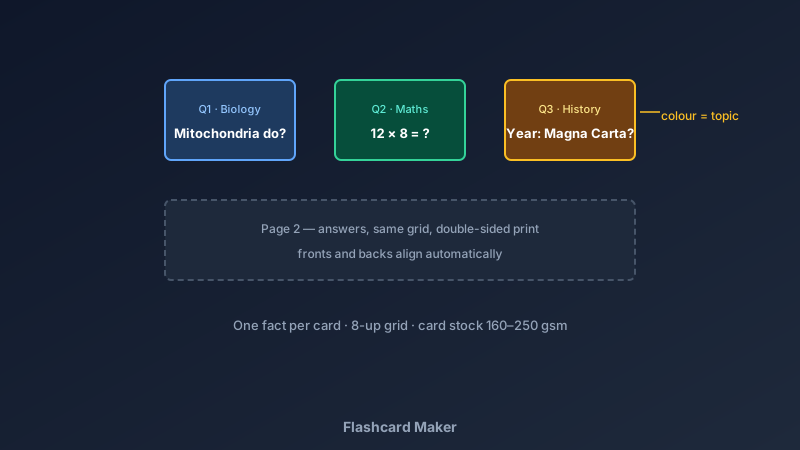
- Colour-code by topic: blue cards for definitions, green for formulas, amber for dates
- Number your cards: shuffling back into order is inevitable — numbering saves it
Build a Set in CollabDraw
- Set the canvas: one page holds a grid of eight cards — 2 rows × 4 columns is standard
- Create the card frame: rounded rectangles with a thin border; duplicate across the grid
- Write the fronts: questions in a large, clear font with the topic tag in a corner
- Duplicate the page for backs: same grid, answers in place of questions — print double-sided and the pairs align
- Add images where they help: diagrams, maps, or photos directly on relevant cards
- Colour-code: a small corner strip per card for topic grouping
- Export the PDF: print on card stock, cut along the grid — a full set in minutes
Sets Worth Making
- Exam revision: one set per syllabus topic; colour strips map to the specification
- Language vocabulary: word on the front, translation and example sentence on the back
- Times tables and maths: question fronts, answer backs — the classic use, still the best
- Science and anatomy: image-based cards where diagrams carry the question
- Classroom sets: teachers print matching-pair games and group quiz decks
- Professional study: certifications, legal terms, medical abbreviations — adults forget flashcards work too
Study Habits That Multiply the Value
- Spaced repetition: review the set at growing intervals — day 1, day 3, day 7
- Shuffle constantly: order creates false confidence; number cards make shuffling recoverable
- Say answers aloud: spoken recall is stronger recall
- Two piles, always: "knew it" and "didn't" — the second pile is tomorrow's starting deck
- Split big sets: 30 cards per deck is manageable; 200 is a brick that never gets opened
Print Quality That Survives Study
- PDF at exact size: grids align perfectly for double-sided printing
- Card stock recommendation: 160–250 gsm — thick enough that answers don't show through
- PNG export: for digital flashcard apps and sharing with classmates
- No watermark: your cards, your study
- Multi-page projects: one page per deck keeps whole subjects in one file
How CollabDraw Compares to Quizlet and Anki
When choosing a free flashcard maker, the main alternatives are Quizlet (free tier now restricts features and pushes subscriptions) and Anki (powerful but with a steep learning curve and dated interface). Here's how CollabDraw stands out:
- Truly free: Full design and print export at no cost
- No sign-up required: Start making cards instantly
- Print-first: physical cards work anywhere — no screen, no battery, no app
- Images included: stock library and uploads for visual subjects
- Collaborate on sets: share a link so classmates and study groups contribute cards
Key Facts About CollabDraw's Free Flashcard Maker
- Price: 100% free — no subscription, no credit card, no watermark
- Layouts: Custom grids — 8-up standard, any card size you need
- Double-sided: duplicate-page workflow aligns fronts and backs for duplex printing
- Images: 7M+ stock photos and personal uploads
- Export formats: PDF (print), PNG (digital) — all free
- Account required: No — start without signing up
- Best for: Exam revision, language learning, classrooms, and professional study
Let the AI Assistant Design It For You
Prefer to skip the manual setup entirely? CollabDraw's free AI Assistant does the heavy lifting. Tell it what you want to make, and it asks a few quick questions about your idea — purpose, style, content — then builds a fully editable, layered design on your canvas. Every element stays editable, so you can refine the result with the techniques in this guide rather than starting from a blank page.
Start From a Ready-Made Template Instead
CollabDraw also includes a built-in template library — 50 editable templates free without an account, 100 with a free account. Ones that match this guide: the Worksheet document template adapts well to card grids. Open the Templates panel, click one, and it drops onto your canvas fully editable — structured layouts ready for your questions.
Print Your First Deck Free
You don't need an account to open CollabDraw and build flashcards. No download, no credit card, no sign-up wall.
Turn revision from re-reading into remembering — free on CollabDraw.