
Fixing Symptoms Is How Problems Come Back
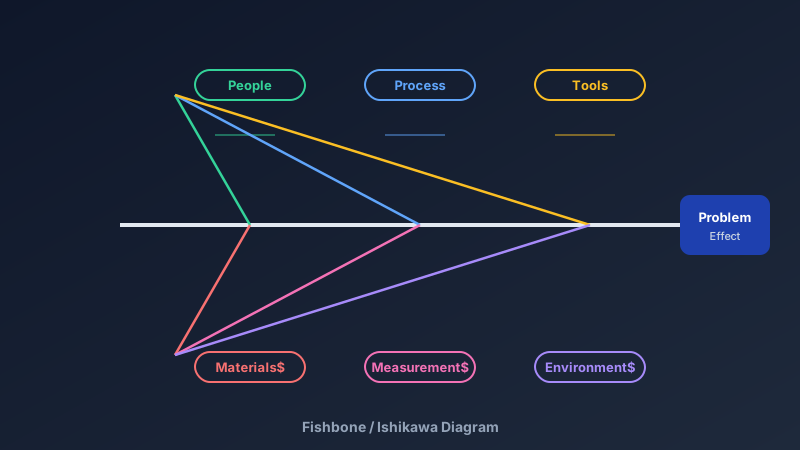
A free fishbone diagram maker is an online tool for building Ishikawa (cause-and-effect) diagrams — a spine leading to a problem statement, with angled branches grouping potential causes into categories. CollabDraw's free fishbone diagram maker gives you guided structure, smart connectors, and real-time collaboration — with no sign-up required.
The fishbone's genius is visual: categories force breadth (what did we miss?) while the spine forces depth (what's actually behind that?).
The Structure, Piece by Piece
- The spine: one horizontal arrow pointing at the effect
- The effect box: a specific problem statement — "checkout errors up 12% since March", not "quality issues"
- Category branches: angled bones grouped by cause family
- Sub-causes: smaller lines off each bone, drilled to observable detail
Choose Categories That Fit Your World
The classic six are Manufacturing's heritage — adapt them to your context:
- Manufacturing: Machines, Methods, Materials, Manpower, Measurement, Environment
- Software: Code, Infrastructure, Process, People, Data, External services
- Service & support: People, Process, Policies, Systems, Training, Customer expectations
- Healthcare: People, Process, Equipment, Information, Environment, Management
The categories are prompts, not doctrine — the goal is coverage, not taxonomy purity.
Build Yours in CollabDraw
- Draw the spine: one long arrow to a labelled effect box on the right
- Add category bones: angled lines off the spine, labelled at the tips
- Brainstorm causes live: the team adds sub-branches simultaneously during the session
- Drill down: for each cause ask "why does that happen?" until you hit something observable
- Mark the suspects: highlight the two or three causes worth investigating with data
Run a Root Cause Session People Don't Hate
- Timebox to 45 minutes: depth comes from focus, not fatigue
- Ban blame language: "the process allowed" not "Dave broke"
- Everyone builds: real-time cursors mean the quietest engineer's causes land on the board
- Vote before investigating: reactions on branches pick the priorities without another meeting
- Pair with 5 Whys: take the top-voted bone and drill it verbally until the floor is reached
Where Fishbones Earn Their Keep
- Incident post-mortems: engineering teams mapping outage contributors
- Quality control: manufacturing defect analysis on the line
- Customer churn: support teams dissecting cancellation reasons
- Clinical audits: healthcare process reviews
- Six Sigma training: the DMAIC Analyse-phase staple, taught everywhere
How CollabDraw Compares to Lucidchart and Miro
When choosing a free fishbone diagram maker, the main alternatives are Lucidchart (3-document free limit) and Miro (3-board free limit). Here's how CollabDraw stands out:
- Truly free: No document limits, no shape caps, no watermark
- No sign-up required: Start diagramming instantly — Lucidchart and Miro both require accounts
- Real-time facilitation: The whole team builds branches simultaneously with live cursors
- Smart connectors: Bones stay attached when you rearrange the spine
- Part of a bigger workspace: Keep the fishbone beside the flowchart and action-item kanban
Key Facts About CollabDraw's Free Fishbone Diagram Maker
- Price: 100% free — no subscription, no credit card, no watermark
- Structure: Spine, effect box, category branches, unlimited sub-causes
- Collaboration: Real-time multi-user building with reactions and comments
- Connectors: Smart lines that re-route when you move branches
- Export formats: PNG, PDF, and SVG — all free
- Account required: No — start without signing up
- Best for: Incident reviews, quality analysis, Six Sigma, process audits, and coursework
Let the AI Assistant Design It For You
Prefer to skip the manual setup entirely? CollabDraw's free AI Assistant does the heavy lifting. Tell it what you want to make, and it asks a few quick questions about your idea — purpose, style, content — then builds a fully editable, layered design on your canvas. Every element stays editable, so you can refine the result with the techniques in this guide rather than starting from a blank page.
Start From a Ready-Made Template Instead
CollabDraw also includes a built-in template library — 50 editable templates free without an account, 100 with a free account. Ones that match this guide: the Fishbone Diagram template. Open the Templates panel, click one, and it drops onto your canvas fully editable — a full fishbone skeleton with category bones already drawn; rename them and add your causes.
Find the Real Cause Free
You don't need an account to open CollabDraw and draw your first spine. No download, no credit card, no sign-up wall.
Quality teams, engineers, and problem solvers: stop firefighting symptoms — free on CollabDraw.