
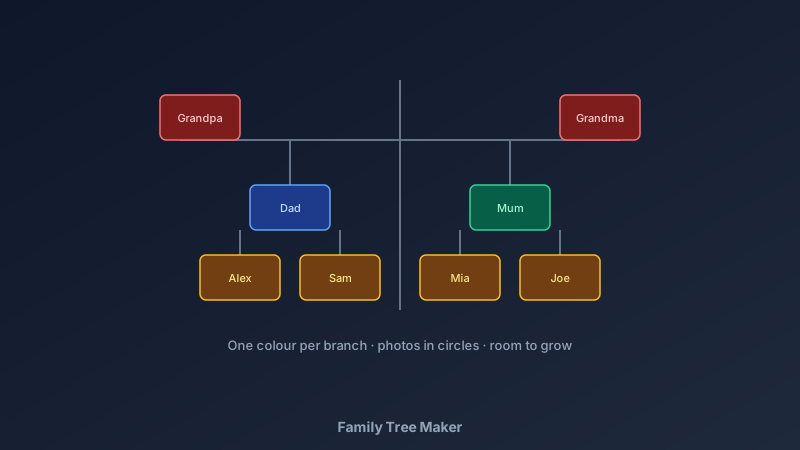
Every Family Has a Story Worth Mapping
A free family tree maker is an online tool for visualising family history — generations connected by lines, each person shown with their name, dates, and often a photo. CollabDraw's free family tree maker gives you shapes, connectors, photos, and print-quality export — with no sign-up required.
Family trees start conversations. Grandparents narrate, parents remember, kids ask questions — the tree on the table does more for family history in one evening than years of good intentions.
Choose Your Tree Type
- Ancestor tree (upward): you at the bottom, parents above, grandparents above them — the classic pyramid, best for personal history
- Descendant tree (downward): the oldest known couple at the top, descendants branching below — best for sharing whole-family research
- Four-generation chart: great-grandparents to children — the sweet spot that fits a poster and covers living memory
- Kids' simple tree: three generations with photos — a school-project favourite
- Full-family wall chart: cousins, aunts, uncles included — a long-term project that grows over years
Build Yours in CollabDraw
- Set the canvas: A3 portrait gives room for four generations with photos
- Create the person nodes: rounded rectangles — duplicate for consistency across the tree
- Connect the generations: straight connector lines between parents and children; keep parent pairs side by side on one line
- Add the details: full name, birth year (and death year where relevant), place of birth
- Add photos: crop portraits into circles inside the nodes — faces make the tree come alive
- Colour by branch: one soft colour per family line so complex trees stay readable
- Export: PDF at print quality for framing, PNG for sharing with relatives
Gathering the Information
- Start with what's alive in memory: interview grandparents and older relatives first — their knowledge is the least recoverable
- Home sources first: birth certificates, photo backs, letters, and the family Bible record more than people expect
- Work outward, not backward: confirm recent generations fully before chasing distant ones
- Record sources as you go: a small note on each node ("census 1951") saves re-research
- Collaborate with relatives: share an edit link — cousins hold pieces you've never seen
Design Choices That Keep Trees Readable
- Consistent node size: same rectangle for every person — size changes signal nothing except confusion
- One line per union: couples share a horizontal line; children hang from it — the standard convention reads instantly
- Dates in small type: names prominent, dates supporting — hierarchy keeps the tree scannable
- Photos in circles: uniform photo treatment prevents visual noise
- Leave room to grow: trees get branches you didn't know about — spacing now saves redesign later
What to Do With the Finished Tree
- Print as a keepsake: PDF at full quality frames beautifully — a landmark birthday gift
- Share digitally: PNG in the family group chat unlocks memories and corrections
- Kids' school projects: the three-generation photo version is a classic assignment, done in an hour
- Reunion centrepiece: print large, hang at the reunion, hand out pens for corrections
- Living document: the saved canvas updates as babies arrive and research progresses
How CollabDraw Compares to Ancestry and MyHeritage
When choosing a free family tree maker, the main alternatives are Ancestry (subscription for tree building beyond a trial) and MyHeritage (free tier limits tree size). Here's how CollabDraw stands out:
- Truly free: No tree-size caps or subscription — design and export free forever
- No sign-up required: Start mapping instantly
- Visual freedom: photos, colours, and layouts exactly how you want — no rigid genealogy forms
- Print-first: wall-quality charts, not just app screens
- Family collaboration: live edit links that turn tree-building into a shared project
Key Facts About CollabDraw's Free Family Tree Maker
- Price: 100% free — no subscription, no credit card, no watermark
- Layouts: Ancestor, descendant, four-generation, or fully custom
- Photos: Personal uploads plus 7M+ stock images with crop tools
- Export formats: PDF (print), PNG (digital) — all free
- Collaboration: Real-time editing with relatives via share links
- Account required: No — start without signing up
- Best for: Family history projects, school assignments, reunion keepsakes, and gifts
Let the AI Assistant Design It For You
Prefer to skip the manual setup entirely? CollabDraw's free AI Assistant does the heavy lifting. Tell it what you want to make, and it asks a few quick questions about your idea — purpose, style, content — then builds a fully editable, layered design on your canvas. Every element stays editable, so you can refine the result with the techniques in this guide rather than starting from a blank page.
Start From a Ready-Made Template Instead
CollabDraw also includes a built-in template library — 50 editable templates free without an account, 100 with a free account. Ones that match this guide: the Org Chart diagram template — its hierarchy-and-connectors layout adapts directly to family trees. Open the Templates panel, click one, and it drops onto your canvas fully editable.
Start Your Family Tree Free
You don't need an account to open CollabDraw and map your family. No download, no credit card, no sign-up wall.
Your family's story deserves more than a shoebox of photos — free on CollabDraw.