
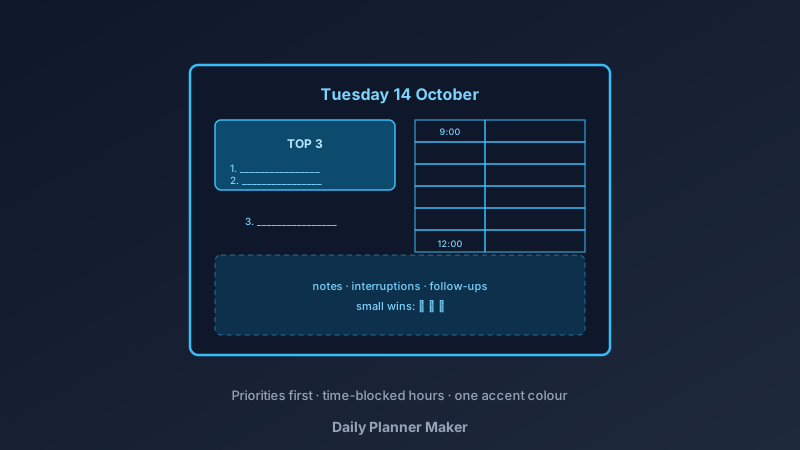
A Page Is the Right Size for a Day
A free daily planner maker is an online tool for designing printable day pages — hourly schedules, priority lists, and note space — exported as print-ready PDFs. CollabDraw's free daily planner maker gives you table grids, precise layout control, and free PDF export — with no sign-up required.
App-based task lists become infinite scrolls of guilt. A single printed page ends when the day ends — a boundary that makes the system sustainable.
The Three Zones of a Good Day Page
- Schedule zone: an hour-by-hour column for meetings, appointments, and time-blocked work
- Priority zone: today's top three — not thirty. If everything is a priority, nothing is
- Capture zone: a blank notes area for the interruptions, ideas, and follow-ups that would otherwise derail the plan
Build Your Page in CollabDraw
- Set the canvas: A4 portrait or A5 — one day per page
- Create the schedule column: the table tool builds the hour rows, 6am to 9pm or your working hours only
- Add the priorities box: three numbered lines at the top — placed before the schedule deliberately, because they matter more
- Include the small wins: a checkbox list for the minor tasks that accumulate
- Reserve the capture area: a lined or blank third of the page
- Style it for handwriting: light grid lines, generous spacing, a calm palette
- Export the PDF: print a stack — or one page per morning
Planner Styles by How You Work
- Time-blocker: every hour assigned — best for meeting-heavy days that need protection
- Task-first: priorities at the top, flexible hours below — best for deep-work days
- Student page: class schedule plus homework priorities and revision slots
- Parent page: family logistics column beside personal priorities — the double-load made visible
- Minimalist page: three lines and a schedule — the version people still use in year three
- Workout log hybrid: a training column beside the daily plan
The Habits That Make Pages Stick
- Fill it in the night before: morning planning happens in the day's chaos; evening planning happens in calm
- Top three before anything else: the schedule serves the priorities, not the reverse
- Time-block the top three first: they get hours, not leftovers
- Review at day's end: thirty seconds — what moved, what didn't, what carries to tomorrow's page
- Forgive the unfinished: the page is a tool, not a judgement
Design Choices That Keep Pages in Use
- Whitespace is the feature: crammed pages don't get filled — breathing room does
- One accent colour: a calm neutral page with one highlight colour for the priorities
- Checkbox satisfaction: empty boxes next to small wins — ticking them is the habit loop
- Day and date prominent: loose pages pile up fast without a clear header
- Undated template: design one page, print forever — the date gets handwritten
Print or Digital — Your Choice
- PDF at exact size: A4 and A5 print true for binders and clipboards
- PNG export: for tablet styluses and digital note apps
- Multi-page projects: a week of pages in one file
- No watermark: your planner, your system
- Pair with the weekly tools: the meal planner and calendar makers share the same canvas — a complete paper system
How CollabDraw Compares to Paper Brands and Canva
When choosing a free daily planner maker, the main alternatives are commercial planner refills (recurring cost, fixed layouts) and Canva (freemium with planner templates behind Pro). Here's how CollabDraw stands out:
- Truly free: Design and unlimited printing at no cost — no refill subscriptions
- No sign-up required: Start designing instantly
- Your layout, exactly: zones, columns, and hours arranged how you work — not how a brand decided
- Print forever: one design, endless pages
- Works with the wider system: calendars, meal planners, and kanban boards in the same tool
Key Facts About CollabDraw's Free Daily Planner Maker
- Price: 100% free — no subscription, no credit card, no watermark
- Layouts: Hourly schedules, priorities, and note zones — fully custom
- Sizes: A4, A5, or custom page dimensions
- Export formats: PDF (print), PNG (digital) — all free
- Account required: No — start without signing up
- Best for: Professionals, students, parents, and anyone replacing app-guilt with paper clarity
Let the AI Assistant Design It For You
Prefer to skip the manual setup entirely? CollabDraw's free AI Assistant does the heavy lifting. Tell it what you want to make, and it asks a few quick questions about your idea — purpose, style, content — then builds a fully editable, layered design on your canvas. Every element stays editable, so you can refine the result with the techniques in this guide rather than starting from a blank page.
Start From a Ready-Made Template Instead
CollabDraw also includes a built-in template library — 50 editable templates free without an account, 100 with a free account. Ones that match this guide: the Weekly Planner board template — its structured day layout adapts directly to single-day pages. Open the Templates panel, click one, and it drops onto your canvas fully editable.
Print Your First Page Free
You don't need an account to open CollabDraw and design your day. No download, no credit card, no sign-up wall.
Tomorrow deserves a plan on paper — free on CollabDraw.