
Website Builders Got Easier, Except When It Mattered
A free AI website builder is a tool that generates a complete website from a plain-English description, without templates to pick through and without hand-coding. CollabDraw's approach is unusual in one decisive way: the AI builds your site as a real, layered design on an infinite canvas, and then you export it as actual HTML, CSS, and JavaScript — files you own. Free accounts get the AI Copilot and 3 website exports every month, with no credit card required.
The first wave of AI website builders solved the blank-page problem: type a business description, and the tool assembles a generic site. The catch arrived later — your site lives on their platform, and changing anything meaningful either requires their editor's constraints or their paid tiers. The AI helped you start; the platform helped itself.
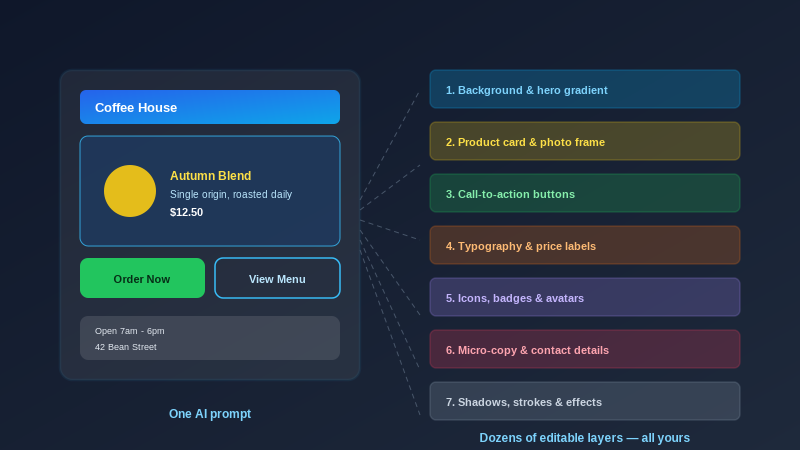
CollabDraw inverts that model. The AI Copilot builds your design as editable layers — every card, button, text block, and icon a separate object you can move, restyle, or delete — and the export hands you the code itself. Nothing is hosted hostage.
What Is an AI Website Builder, Exactly?
An AI website builder is a tool that uses a language model to translate a natural-language description into a designed web page — layout, colours, typography, sections, and content structure — so you skip the blank-canvas phase entirely.
There are two architectures, and the difference matters more than the marketing suggests:
- Hosted-generation builders — the AI generates a page inside a proprietary editor on the vendor's platform. You edit within their constraints and publish under their pricing. Your "website" is a row in their database.
- Design-first builders with export — the AI generates a real design you can edit at the object level, then a separate export step produces standard web files. Your website is a folder of files on your own machine.
CollabDraw is the second kind. The generation is visual and layered; the output is standard code. That combination is what makes the result genuinely yours.
How CollabDraw's AI Website Builder Works — Step by Step
- Open the AI chat and describe your site — one or two sentences is enough: "A clean online marketplace for handmade ceramics with product grids and a checkout summary"
- Answer a quick clarifying question if asked — the Copilot may ask whether you want web or mobile, or which direction to take; a one-word answer keeps the flow moving
- Watch the layered design build itself — background bands, cards, navigation, buttons, text, and icons appear as individually editable canvas objects inside a frame
- Refine anything on the canvas — change a colour, retype a headline, move a section; every layer is a normal canvas object, or just tell the Copilot what to change
- Click "Export as Website" on the frame — the three-stage AI pipeline (planning, building, reviewing) converts the design into code
- Preview, then download the ZIP — index.html, styles.css, and script.js; unzip, open the HTML in any browser, and the site works offline
The same flow works whether you start from a prompt, a template, or your own sketch — anything inside a frame can be exported.
What the AI Copilot Can Build — Then Export — For Free
The Copilot is not limited to landing pages. Because it builds layered designs with proper UI controls — buttons, inputs, dropdowns, multi-step flows — the exported sites carry real interactivity, not static mock-ups. Examples of what people describe and ship:
- Online marketplaces — product grids with filter sidebars, category chips, price badges, seller cards, and a multi-step checkout summary
- Analytics dashboards — KPI cards, chart panels, sidebar navigation, and data tables in dark or light themes
- Booking and reservation sites — date pickers, guest selectors, step-by-step flows, and price breakdowns that advance through stages
- Mobile app screens — onboarding, profiles, and settings drawn on phone frames, exported as interactive pages
- SaaS landing pages — gradient heroes, feature grids, pricing tables, FAQ accordions, and testimonial sections
- Portfolios and agency sites — editorial layouts, project galleries, and contact forms with distinctive typography
Every one of those exports as three plain files you own outright — commercially usable, no attribution, no watermark. The AI builds it; the code export makes it real; both are free.
Why Export Beats Hosting
No platform risk
Hosted builders can change pricing, templates, or terms — and your site comes along for the ride. An exported site is a folder of standard files that no vendor controls. The web has run on files for thirty-five years; that durability is the point.
No performance tax
Hosted builder pages often ship hundreds of kilobytes of platform JavaScript before your content appears. A dependency-free export loads nearly instantly, works on slow connections, and scores well on every performance metric that affects search ranking.
Handoff freedom
Exported code drops into any workflow: give it to a developer to extend, host it on any static host, or edit it yourself. You are never choosing between "the AI's version" and "the developer's version" — it is all the same files.
The Workflow End to End: Prompt to Live Site
A realistic session looks like this: describe a marketplace in the morning, spend five minutes nudging the generated layers — a warmer accent colour, a tighter hero, real product names — export the frame, and have a working, offline-capable site in the preview dialog before your coffee cools. Download the ZIP and it is deployable anywhere.
Refinements are cheap. Tell the Copilot "make the booking card more prominent" and it adjusts the layers; export again. Each iteration costs seconds, not a rebuild. And because the export preserves exact colours, spacing, and typography, what you approved on the canvas is what the code delivers.
How CollabDraw Compares to Wix ADI, Framer AI, Durable, and 10Web
When choosing a free AI website builder, the main alternatives are Wix ADI (free to start, publishing and removing ads requires paid plans), Framer AI (generative and polished, but publishing on a custom domain is subscription-only), Durable (built for speed, monetised through subscription hosting), and 10Web (WordPress-focused with AI generation behind paid tiers). Here's how CollabDraw stands out:
- Truly free: The AI Copilot and 3 monthly website exports are free — no credit card, and the free tier is not a trial
- You own the output: The exported files are yours outright; no vendor hosts your site or meters your traffic
- Layered, editable generation: The AI's output is individual editable objects, not a fixed template you can only nudge
- Standard code, zero dependencies: Plain HTML, CSS, and vanilla JS — readable by a beginner, extendable by a developer
- One workspace: The same canvas handles design, AI generation, diagrams, and docs — the site lives next to the rest of your work
Key Facts About CollabDraw's Free AI Website Builder
- Price: 100% free — AI Copilot included; 3 website exports per month on free accounts, 20 on Pro, no credit card
- Input: A plain-English description; optional one-tap answers to clarifying questions
- Output: A layered, fully editable canvas design plus an exportable ZIP — index.html, styles.css, script.js
- Interactivity: Drawn buttons, inputs, dropdowns, and multi-step flows become working controls; connectors stay attached during drags
- Offline: Exported sites run from the file system with no server and no internet connection
- Dependencies: None — no frameworks, no libraries, no external requests
- Preview: Live interactive preview inside the export dialog before download
- Ownership: Full commercial rights to everything you generate and export — no attribution, no watermark
- Account required: No — start prompting without signing up
- Best for: Founders validating ideas, marketers shipping campaign pages, agencies prototyping in front of clients, and non-coders who want files they own
Describe It, Build It, Own It
The promise of AI website building was never "answer three questions and get a template." It is this: say what you want, get a real design you can steer, and keep the result. CollabDraw delivers the full loop — prompt to layered design, design to code, code to your own folder — free.
Open CollabDraw, describe the site you have been putting off, and export it today. The blank page never stood a chance.