
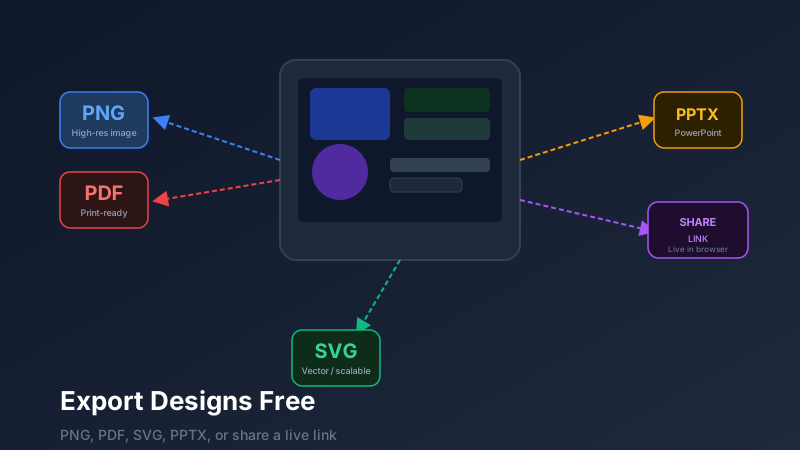
The Export Decision: Which Format for Which Job?
Design export is the process of saving a canvas creation in a shareable file format — such as PDF, PNG, SVG, or PPTX — for use outside the design tool. CollabDraw supports five export formats plus live share links with view, comment, and edit permissions, all free with no watermark, no sign-up required, and no recipient software needed.
CollabDraw supports five export formats plus a live share link option, each optimised for different use cases.
PNG Export
Best for: Digital use, presentations, social media, email attachments, website images
PNG is the universal "screenshot of your design" format. It produces a raster (pixel-based) image at a resolution you choose — typically 1x (screen resolution), 2x (retina), or custom DPI for print.
When to use PNG:
- You need to insert the design into a Word document, Google Slides, or email
- You're sharing a preview of a design on social media
- Your recipient doesn't have a design tool and just needs an image
- You're generating a blog thumbnail or marketing visual
Export tip: For digital use at standard screen sizes, 1x is sufficient. For anything that will be displayed at high resolution (Retina screens, printed large format), choose 2x or 3x.
PDF Export
Best for: Print, professional documents, multi-page presentations, client deliverables
PDF preserves your design with full vector fidelity — text remains crisp and sharp at any zoom level, and the document is universally viewable without any special software.
When to use PDF:
- You're sending a design to a print shop
- You're creating a deliverable document for a client (proposals, reports, brand guides)
- You have a multi-page design and want a single file containing all pages
- Your recipient needs to print or annotate the design
SVG Export
Best for: Developers, web implementation, logos, icons at any scale
SVG (Scalable Vector Graphics) is a resolution-independent XML format. An SVG icon is equally sharp at 16px and 1600px. Developers love SVG because it can be styled with CSS, animated with JavaScript, and embedded directly in HTML.
When to use SVG:
- You're handing off icons or logos to a developer
- The design includes crisp geometric shapes that need to scale without quality loss
- You need to embed a design into a web page directly
PPTX Export (PowerPoint)
Best for: Presentation handoffs, stakeholders who work in PowerPoint, slides that need further editing
PPTX export converts your CollabDraw canvas pages into editable PowerPoint slides. This is invaluable when a client or colleague needs to continue editing the presentation in Microsoft Office.
When to use PPTX:
- Your client or colleague works exclusively in PowerPoint
- You're handing off a presentation template for someone else to populate with content
- You need the presentation to remain editable after export
Live Share Links
Best for: Design reviews, client collaboration, stakeholder presentations, always-current references
A live share link is unique to CollabDraw's workflow. Instead of exporting a static file, you share a URL that always displays the latest version of your design. Recipients open it in a browser — no account, no software.
You control permissions:
- View — see the design, zoom, navigate pages
- Comment — leave contextual notes on specific elements
- Edit — full collaborative editing access
Add a password and an expiry date for confidential work.
Multi-Page Export
CollabDraw supports multi-page projects via the Pages system. When exporting as PDF, all pages are included in order. When exporting as PNG, you can export all pages as individual files or a single combined sheet. PPTX export maps each page to a slide.
How CollabDraw Compares to Figma, Canva, and Adobe
When choosing a free design export tool, the main alternatives are Figma (limited export formats on free tier), Canva (watermarks and paid-only formats on free plan), and Adobe (subscription required for all export). Here's how CollabDraw stands out:
- Truly free: All export formats — PDF, PNG, SVG, PPTX — with no watermarks or paid gating
- No sign-up required: Start instantly — Figma, Canva, and Adobe all require account creation
- All formats included: SVG and PPTX export are free — Canva gates these behind paid plans
- Live share links: Always-current shareable URLs with granular permissions at no cost
Key Facts About CollabDraw's Free Design Export
- Price: 100% free — no subscription, no credit card, no watermark
- Formats: PDF, PNG, SVG, PPTX, and live share links
- Permissions: View, comment, and edit with password and expiry options
- Export formats: PNG, PDF, SVG, PPTX — all free
- Account required: No — start without signing up
- Best for: Client deliverables, print, web handoff, and stakeholder presentations
Export Checklist Before Sending
- Check the correct pages are selected for export
- Verify the resolution setting matches the intended use (screen, print, retina)
- Review the export preview before downloading
- For PDFs, confirm font embedding and colour accuracy
- For share links, confirm the permission level matches the recipient's role